

Imagine trying to navigate a sprawling, constantly changing metropolis without a map or street signs. That is exactly what browsing the internet would be like without the Domain Name System (DNS). Every time you type a URL into your browser, a complex background process instantly routes you to the correct server. But who manages this invisible routing system? If you are building a website, optimizing for speed, or securing your digital assets, you will inevitably ask: what is a dns hosting provider?
A clear understanding of the fundamentals of web hosting can help you make a more informed decision when selecting a provider.
Table of Contents
In this comprehensive guide, we will break down the mechanics of DNS, explore the difference between basic and premium setups, and explain why upgrading your digital infrastructure might be the smartest technical decision you make this year.
What is DNS? The Backbone of the Internet
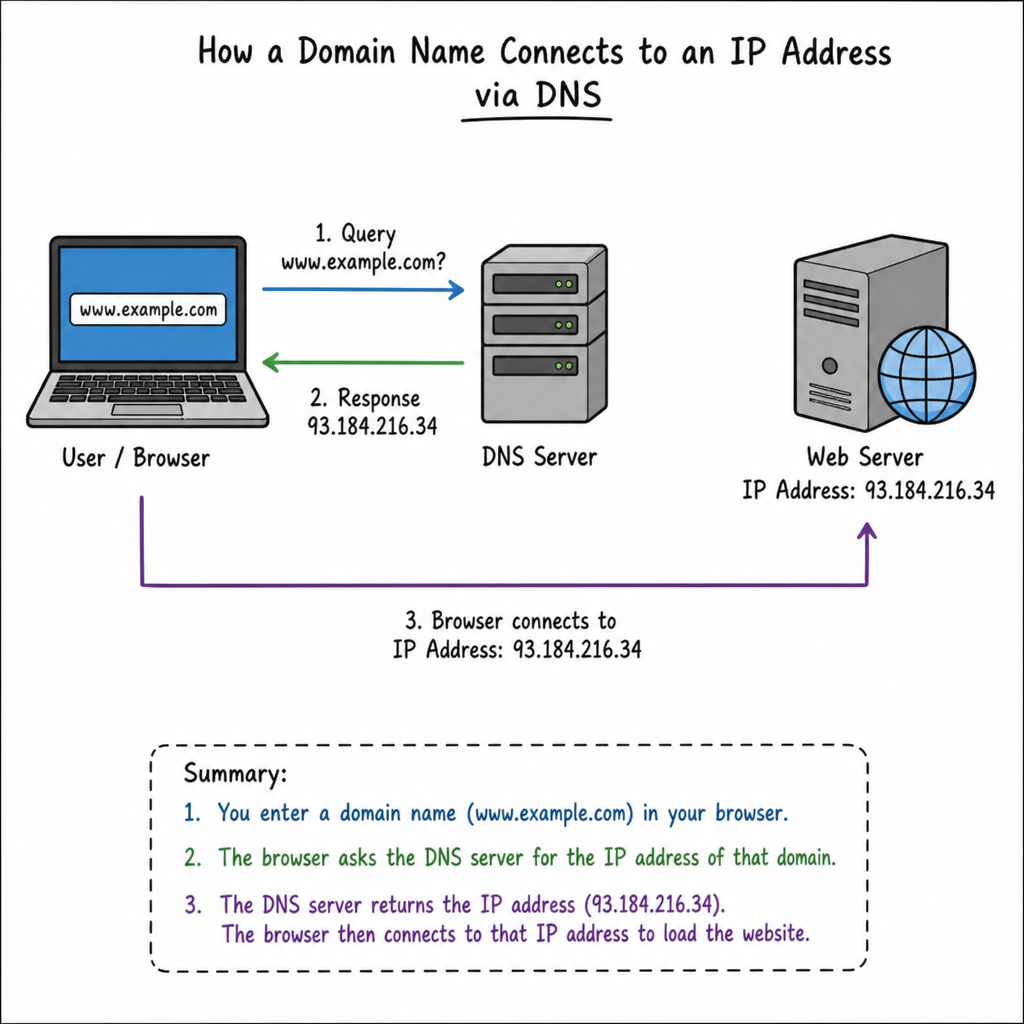
Before we can answer exactly what a provider does, we must first answer the fundamental question: what is dns?
DNS stands for Domain Name System. It is frequently described as the phonebook of the internet. Computers and servers communicate using IP addresses (like 192.168.1.1 or 2400:cb00:2048:1::c629:d7a2), which are difficult for humans to memorize. DNS bridges this gap by translating human-readable domain names (like yourwebsite.com) into machine-readable IP addresses.
To understand this process, it helps to know the difference between authoritative vs recursive name servers.
- Recursive Name Servers: These act as the middleman. When you type a website into your browser, your internet service provider (ISP) uses a recursive server to go out and “ask” the internet where that website lives.
- Authoritative Name Servers: These hold the actual answer. They are the final stop in the DNS lookup process, containing the official, updated IP address for a specific domain.
A DNS host operates these authoritative servers, ensuring that when a recursive server asks for your website’s location, it gets the correct answer instantly.
DNS Hosting Explained
So, what is a dns hosting provider? Simply put, it is a company that runs domain name servers to manage and host your domain’s DNS records. They provide the infrastructure that keeps your website connected to the internet’s mapping system.
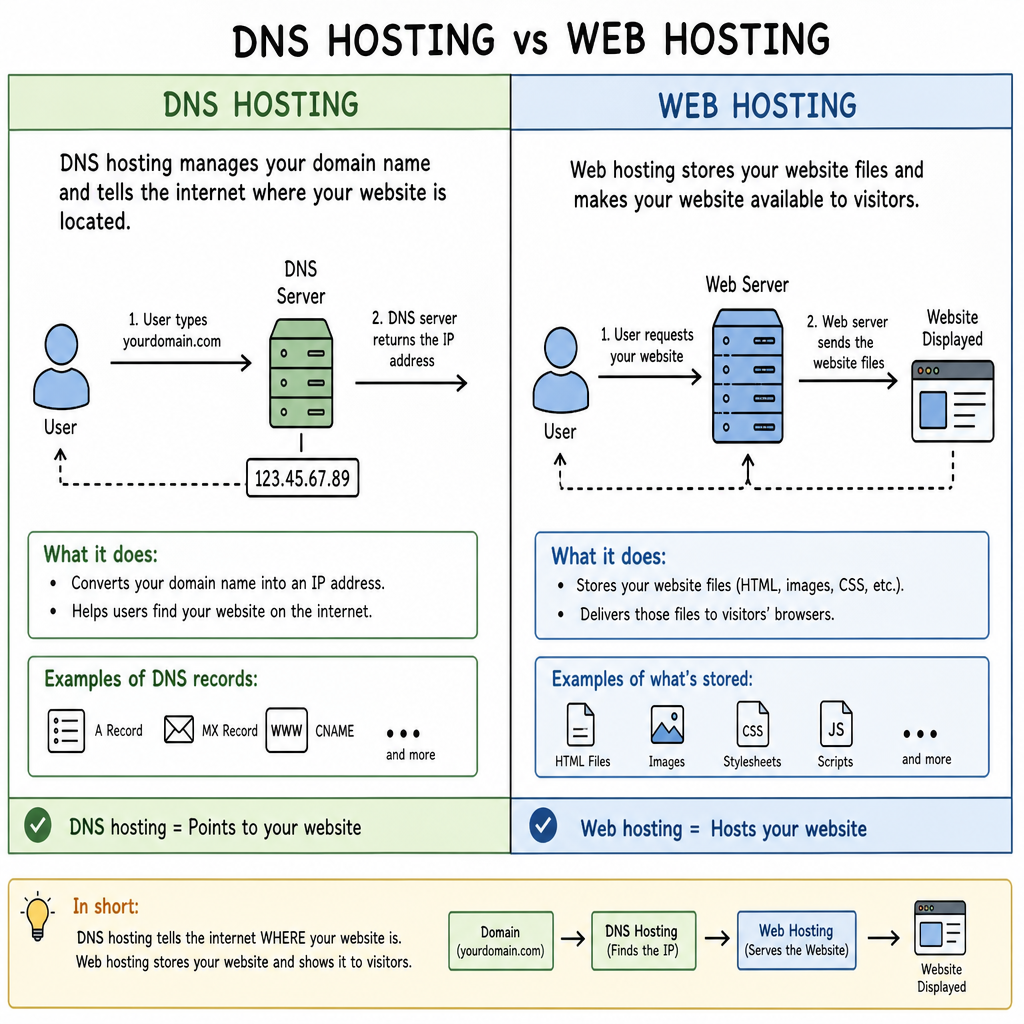
When searching for the answer to what is dns hosting, people often confuse it with standard web hosting. It is crucial to draw a line between the two:
- DNS hosting stores the map (the DNS records) that tells the internet where your website files are located.
- Standard dns web hosting or dns website hosting (often just called web hosting) stores the actual website files, databases, and images.
Even if you have the best web host in the world, your visitors cannot reach your site if your DNS host goes offline. Your DNS infrastructure is the vital gatekeeper to your content.
The Difference Between Domain Registrar and DNS Host
One of the most common points of confusion for website owners is understanding the difference between domain registrar and DNS host.
A domain registrar is the company where you lease your domain name (like GoDaddy or Namecheap). By default, most registrars provide basic, free DNS hosting with your domain purchase. Because they are bundled together, many people assume they are the same thing.
However, they serve different functions. The registrar manages your ownership of the domain name, while the DNS host manages the routing of traffic. You are not required to use your registrar’s default DNS. In fact, for performance and security reasons, separating these services by pointing your registrar to a specialized DNS host is often recommended for growing businesses.
Deep Dive: Managing DNS Records
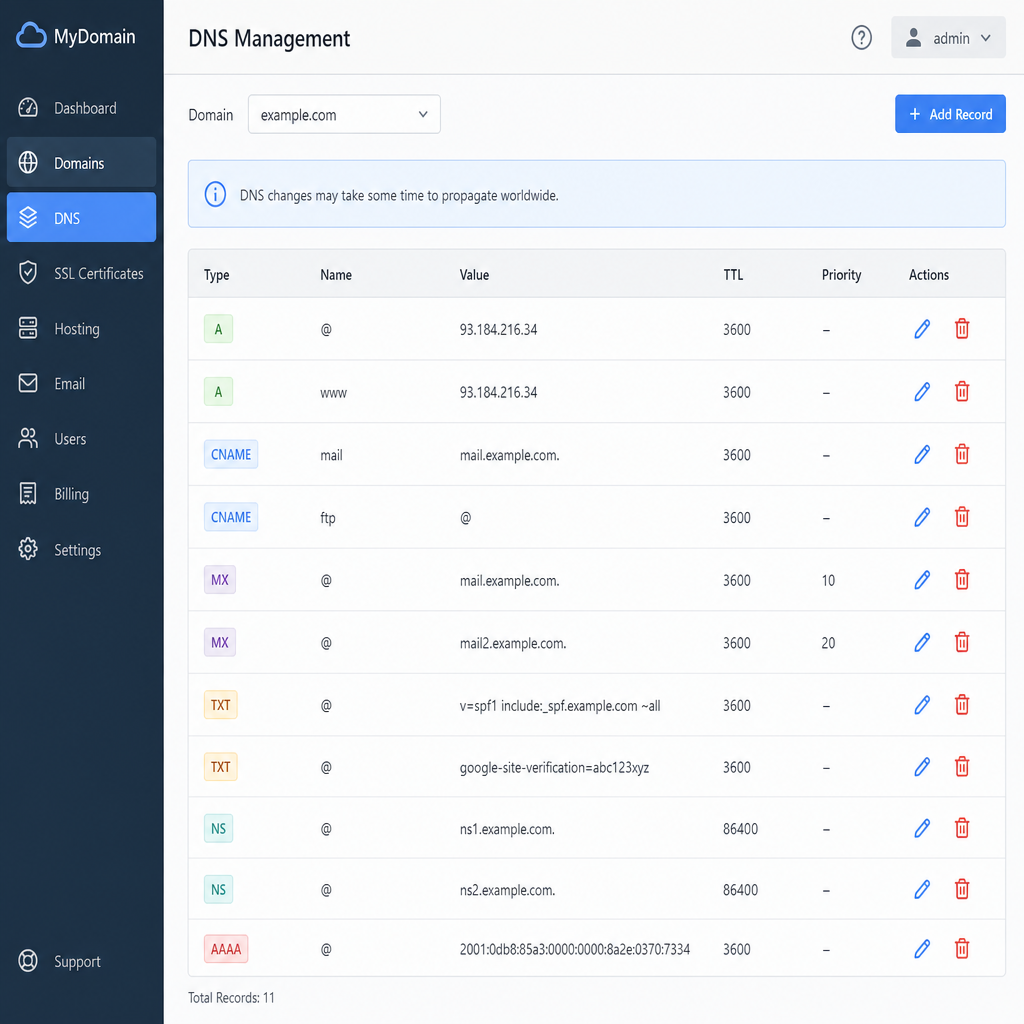
When you use a DNS hosting platform, you will interact heavily with a DNS zone file. Understanding DNS zone files is essential; this file is essentially a text document stored on the authoritative server that contains all the individual DNS records for your domain.
Let’s look at common DNS record types explained in simple terms:
- A Record (Address Record): This points your domain directly to an IPv4 address.
- AAAA Record: Similar to an A record, but it points to a newer IPv6 address.
- MX Record (Mail Exchange): Directs incoming emails to your mail server (like Google Workspace or Microsoft 365).
- TXT Record (Text Record): Used for verifying domain ownership and setting up email spam prevention (like SPF, DKIM, and DMARC).
One of the most frequent tasks you will perform is configuring A and CNAME records. While an A record points a domain directly to an IP address, a CNAME (Canonical Name) record points a subdomain or alias to another domain name. For example, you might use a CNAME record to point www.yourwebsite.com to yourwebsite.com.
Why Use a Third-Party DNS Provider?
If your domain registrar gives you DNS for free, why use a third party DNS provider? The answer comes down to performance, reliability, and security. Relying on default registrar DNS is fine for a hobby blog, but businesses require robust infrastructure.
Here are the standout managed DNS service benefits you gain by upgrading.
1. Superior Speed and Global Reach
Every millisecond counts when loading a webpage. If your registrar’s default DNS servers are located in New York, a user visiting your site from Tokyo will experience a noticeable delay while the DNS lookup travels across the globe.
Premium providers solve this through Anycast networks. Understanding how anycast network improves speed is straightforward: instead of having one server in one location, an Anycast network distributes identical IP addresses across multiple servers worldwide. When a user requests your site, the network automatically routes the request to the geographically closest server.
This directly correlates to the impact of DNS latency on SEO. Search engines like Google factor page load speed into their ranking algorithms. A slow DNS lookup delays the entire page rendering process, potentially hurting your search rankings. Faster DNS means better SEO.
Additionally, premium DNS networks excel at reducing DNS propagation time. While standard DNS updates can take 24 to 48 hours to propagate globally, specialized providers can push DNS changes across their networks in a matter of seconds.
2. Bulletproof Security
The internet can be a hostile environment, and your DNS is a frequent target for cyberattacks.
A primary concern is protecting domains from DDoS attacks (Distributed Denial of Service). In a DNS-targeted DDoS attack, hackers flood your name servers with fake traffic, overwhelming them and knocking your website offline. Specialized DNS hosts utilize massive global bandwidth and advanced filtering algorithms to absorb and neutralize DDoS attacks before they impact your site.
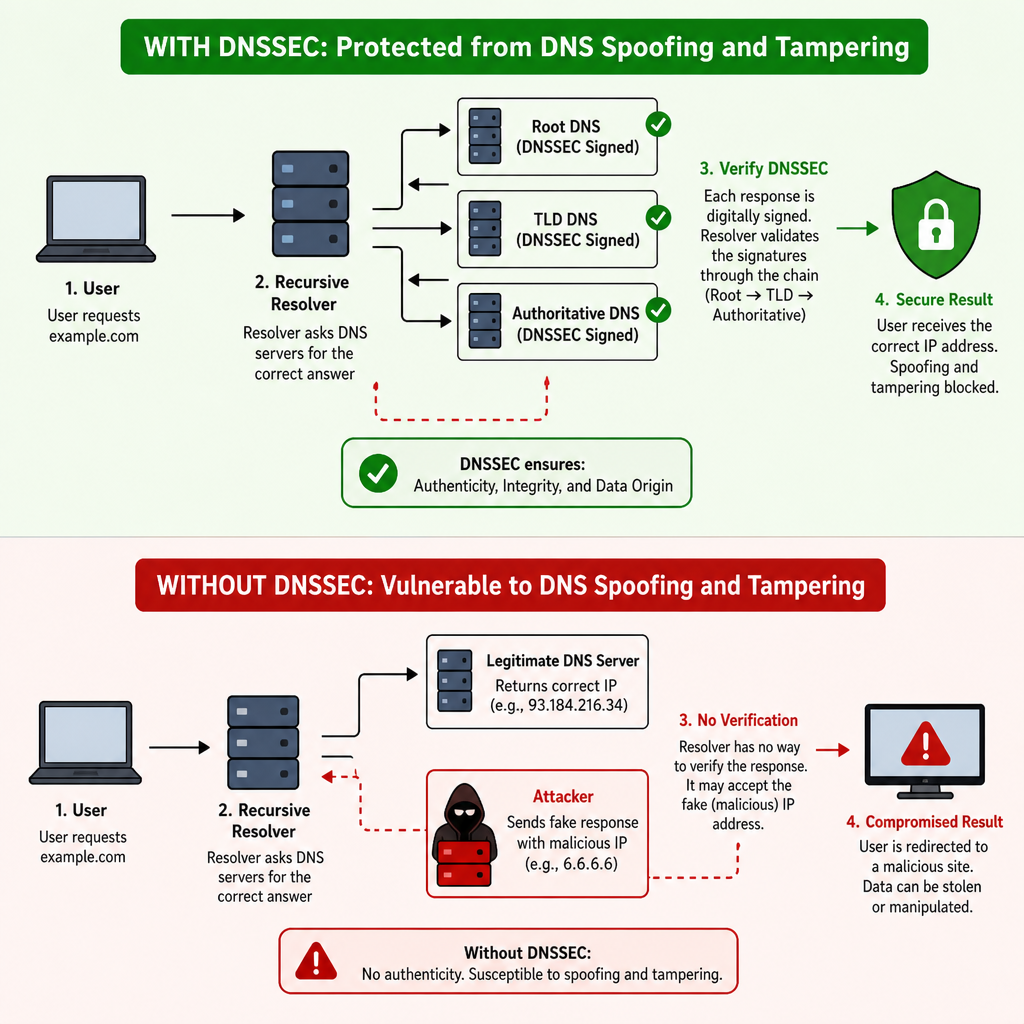
Another critical security measure is implementing DNSSEC for domain security. DNSSEC (Domain Name System Security Extensions) adds cryptographic signatures to your DNS records. This prevents attackers from tampering with your DNS responses and redirecting your users to malicious phishing websites. Most premium DNS hosts offer one-click DNSSEC enablement.
3. Advanced Features for Growing Brands
As your business scales, your technical needs become more complex. Premium providers offer powerful enterprise DNS management features such as:
- Geo-Routing: Directing users to different servers based on their physical location (e.g., sending European users to a server in Frankfurt and US users to a server in Chicago).
- Failover Routing: Automatically monitoring your web servers. If your primary server goes down, the DNS host instantly updates your records to point traffic to a backup server, ensuring 100% uptime.
- Load Balancing: Distributing incoming web traffic evenly across multiple servers to prevent any single server from becoming overwhelmed.
Furthermore, premium providers allow for setting up custom nameservers (also known as vanity nameservers). Instead of your domains pointing to ns1.provider.com, you can white-label them to read ns1.yourbrand.com. This adds a layer of professionalism and brand consistency for digital agencies and large enterprises.
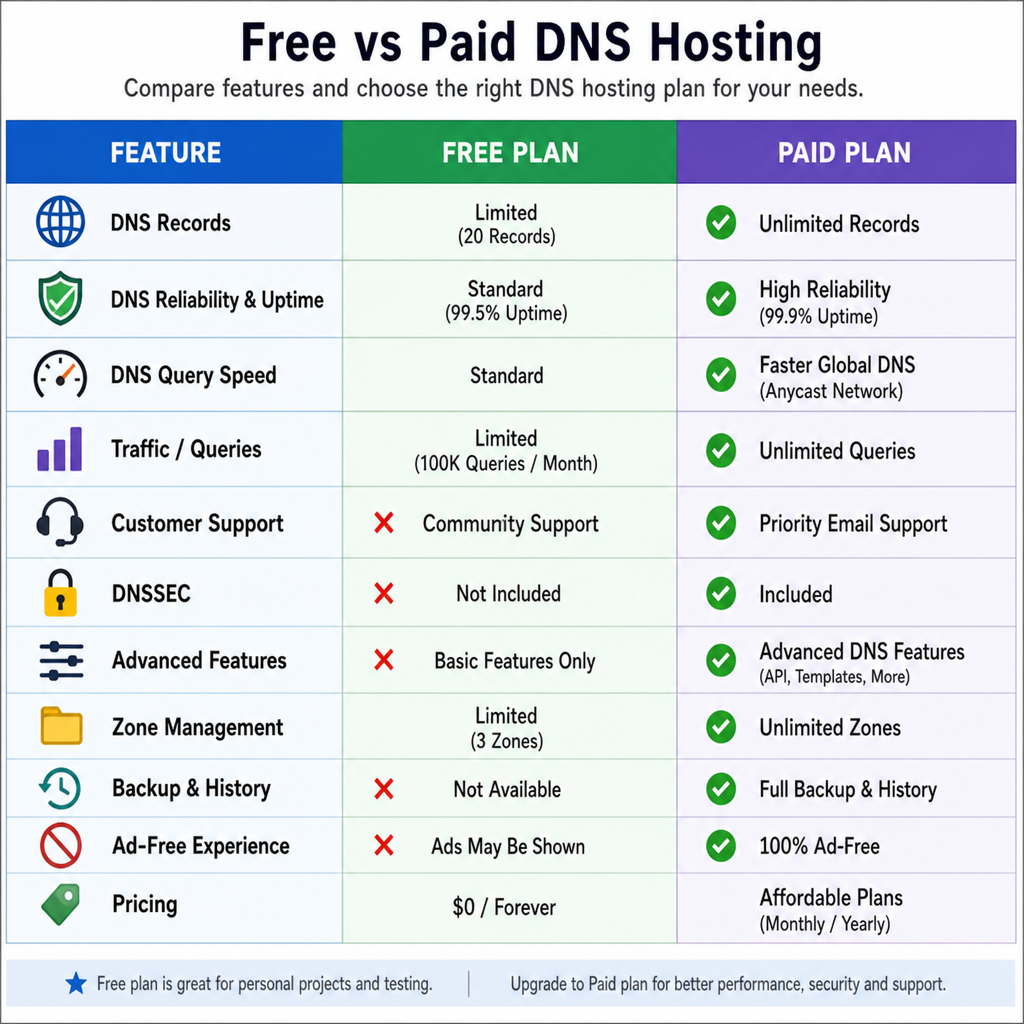
Choosing the Right Solution: Free vs Paid DNS Hosting
Understanding the landscape of providers requires weighing free vs paid DNS hosting.
- Free DNS: Offered by registrars and some third parties (like Cloudflare’s free tier). It is generally sufficient for personal portfolios, small blogs, or businesses with localized, low-volume traffic.
- Paid/Managed DNS: Starts at a few dollars a month and scales up to enterprise tiers. You are paying for a 100% uptime Service Level Agreement (SLA), advanced analytics, query-level routing, robust DDoS mitigation, and dedicated support.
When searching for the best dns providers, consider industry leaders like Cloudflare, Amazon Route 53, DNSMadeEasy, NS1, and Google Cloud DNS. Evaluate them based on their network size (number of Points of Presence or PoPs worldwide), query speed, security features, and ease of use.
Conclusion
To return to our original question—what is a dns hosting provider?—it is the silent engine running in the background of your digital presence. It is the service that ensures every user who wants to visit your site actually arrives there safely, securely, and as quickly as possible.
While the free DNS provided by your domain registrar might get you started, transitioning to a dedicated, managed DNS provider unlocks critical speed optimizations, protects you from malicious downtime, and provides the advanced routing tools necessary to scale. Whether you are an e-commerce store losing conversions to slow load times, or a SaaS company that requires 100% uptime, taking control of your DNS hosting is a foundational step in mastering your online infrastructure.
By understanding your DNS zone files, optimizing your records, and partnering with a premium provider, you ensure that your slice of the internet remains highly available, incredibly fast, and fiercely secure.
Ready to launch or upgrade your website? Visit Hostinger and compare its hosting plans to find the right option for your needs.
“This article contains affiliate links, meaning we may earn a commission at no additional cost to You “ editorial@BLAK BEIGE