

Have you ever typed a URL into your browser, watched a beautifully designed website instantly appear on your screen, and wondered where that website actually “lives”? Creating a website is an exciting endeavor for any business owner, blogger, or developer, but behind every stunning online storefront and engaging blog is a complex, unseen digital infrastructure.
If you are taking your first steps into website creation, your very first question is likely: what is internet hosting? Without it, the internet as we know it simply wouldn’t exist. Before you can successfully launch your digital presence, you must properly define hosting and understand how this foundational technology connects your unique content to a global audience.
Before selecting a hosting plan, read our detailed breakdown of the top 10 fastest web hosting providers in 2026 to see how the leading companies compare.
Table of Contents
In this comprehensive guide, we will break down the complex jargon, explore how the underlying technology operates, and give you the actionable knowledge you need to build a rock-solid foundation for your online venture.
The Fundamentals: What Exactly is Web Hosting?
To get started, we need a clear and practical web hosting definition. In the simplest terms, web hosting is the process of renting or buying secure storage space on the internet to house your website. When someone asks, “what is a web hosting service?” they are referring to a specialized company that provides the underlying technologies, hardware, and server space necessary for a website to be accessed and viewed online.
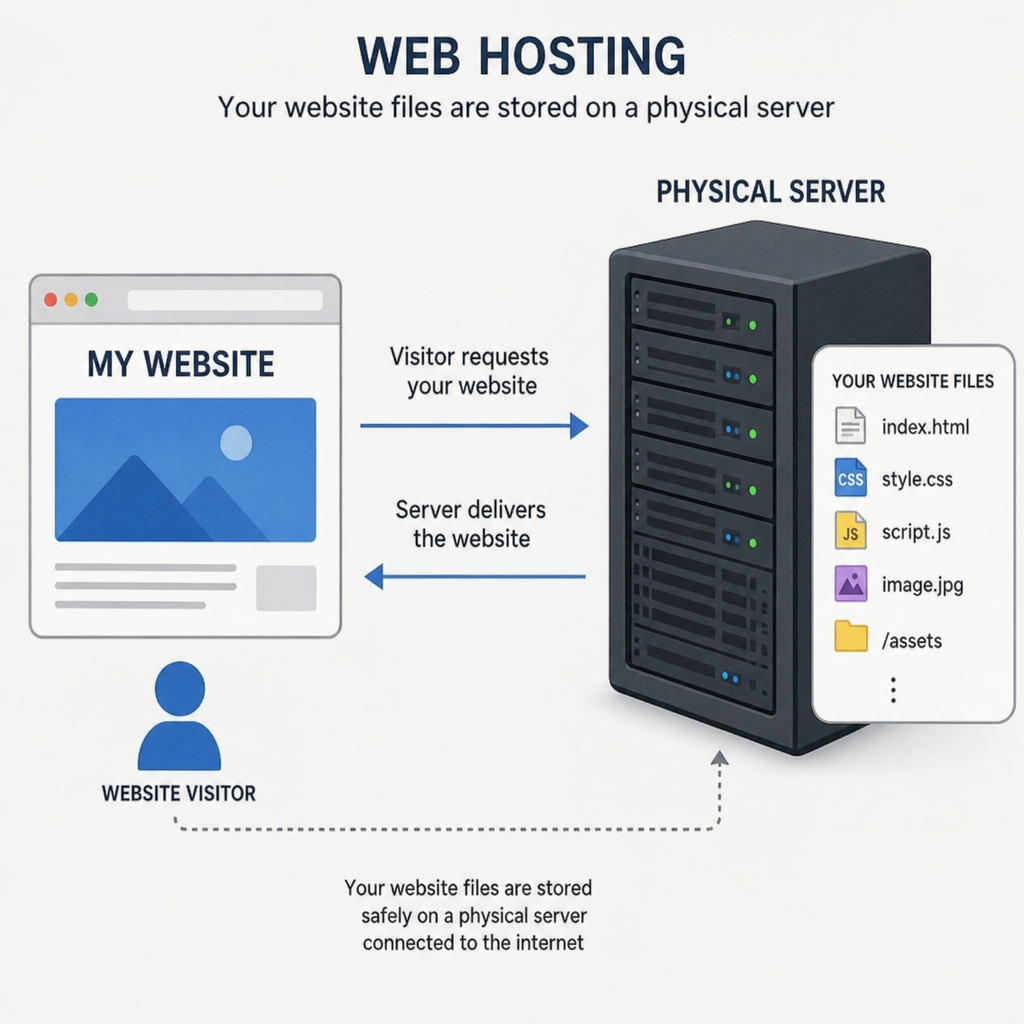
So, practically speaking, what does hosting do? It takes all the individual elements that make up your website—your HTML and CSS files, documents, databases, high-resolution images, and videos—and stores them safely on a highly powerful, specialized computer known as a server.
Whether you are launching a massive, multi-national e-commerce platform or you simply need to know what is web page hosting to set up a basic, one-page digital resume, the core concept remains completely unchanged. The overall web hosting services meaning boils down to this: hosting provides your website with its physical, digital home on the internet, keeping your files safe and serving them up to anyone who requests to see them.
Clearing the Confusion: The Address vs. The House
One of the most common stumbling blocks for beginners is understanding the difference between domain name and web hosting. Because these two elements are often purchased together from the same company, many people mistakenly believe they are the exact same thing.
To separate the two, it helps to use a real estate analogy:
- The Domain Name: This is your street address (e.g., www.yourbusiness.com). It tells visitors exactly where to go to find you. Without an address, people would have to memorize a long string of complex numbers (an IP address) to find your site.
- The Web Hosting: This is the physical house or plot of land where your belongings live.
If you register a domain name but don’t purchase hosting, you simply have an empty plot of land with a street sign. If you buy hosting but no domain, you have a fully furnished house hidden in the woods with no roads leading to it. You must have both working in harmony to have a functional website.
Behind the Scenes: The Technical Process
To truly grasp how does web hosting work for beginners, imagine you are visiting a massive, automated digital library.
When a user opens their browser and types in your domain name, their computer sends a complex request across the internet. This request looks up your domain name’s associated IP address and locates the specific server holding your files. The server then locates the requested page, packages up all the text, images, and layout instructions, and sends them back over the internet to the user’s screen in a matter of milliseconds.
This incredible speed and reliability highlight the critical role of data centers and servers in website accessibility. A web server is not just a standard laptop; it is an industrial-grade computer designed to run non-stop, 24 hours a day, 365 days a year. These servers are housed in massive, highly secure facilities known as data centers. Data centers provide enterprise-level cooling systems, backup power generators, and premium internet pipelines to ensure that physical hardware failures or local power outages do not take your website offline.

Tailoring to Your Needs: Hosting Varieties
Not all websites are created equal, and therefore, not all hosting environments are the same. A simple blog gets different amounts of traffic than a major online retailer. Below are the primary types of web hosting services explained so you can align your infrastructure with your business goals.
Exploring the Big Three
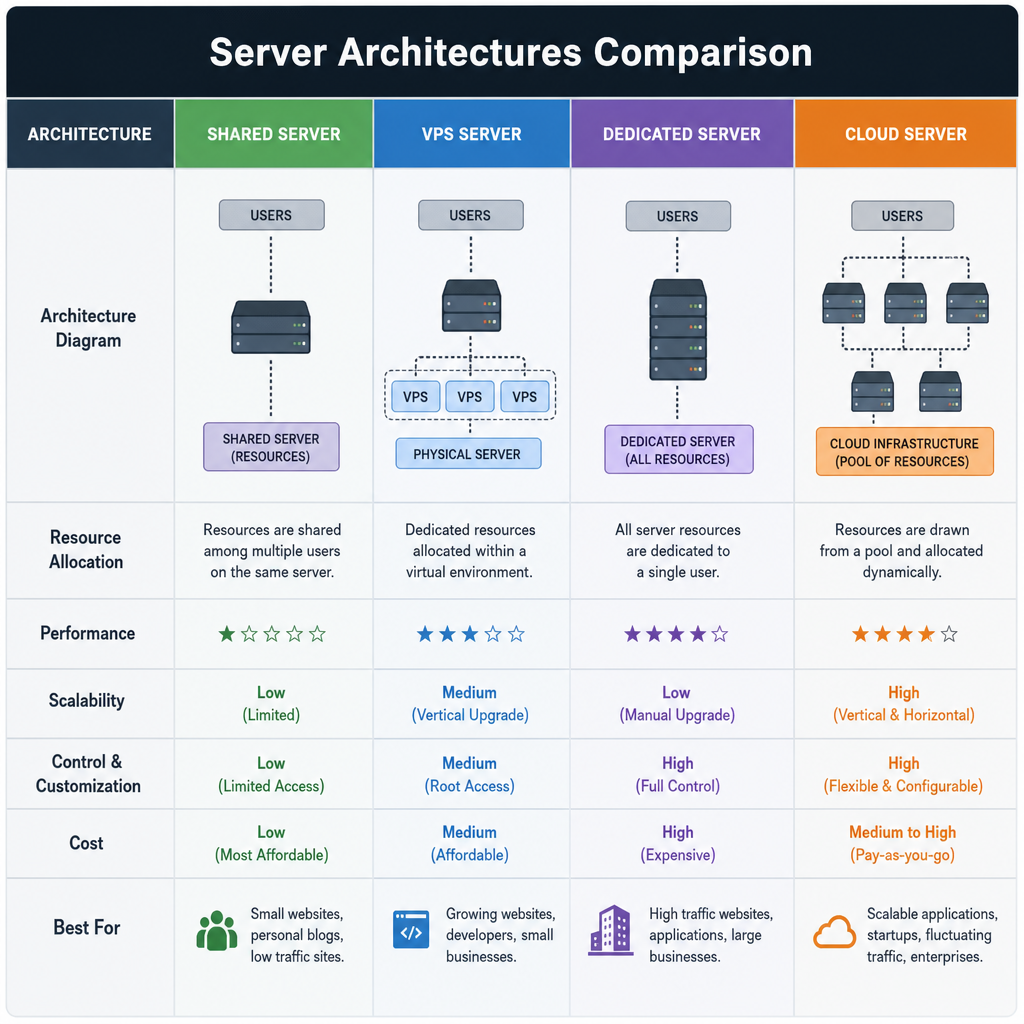
When comparing shared vs virtual private server vs dedicated hosting, it is best to continue our real estate analogy to see which environment fits your needs:
- Shared Hosting: Think of this as renting a room in a bustling apartment complex. You share the main server—and its vital resources like memory, processing power, and storage—with hundreds of other websites. It is incredibly cost-effective, making it great for beginners. However, if a neighboring website experiences a massive surge in traffic, it can slow down the entire server, including your site.
- Virtual Private Server (VPS) Hosting: This is akin to owning a townhouse. You still share the overarching physical hardware with other users, but the server is divided into distinct, isolated virtual compartments. You are guaranteed a specific amount of resources that no one else can touch. It offers a great balance of cost, performance, and customization.
- Dedicated Hosting: This is the equivalent of owning a massive, single-family mansion. You rent an entire physical server exclusively for your website. You have total control over the server’s configuration, operating system, and security protocols. It provides peak performance but comes with a premium price tag and requires advanced technical knowledge to manage.
Modern Solutions: Cloud and WordPress
As technology has advanced, new hosting paradigms have emerged to solve modern problems. For growing businesses, the benefits of cloud hosting for scalability cannot be overstated. Instead of relying on one single physical server, cloud hosting pulls processing power and storage from a vast, interconnected network of virtual servers. If one of your marketing campaigns goes viral and traffic skyrockets, a cloud environment can instantly scale up your resources to handle the surge without crashing, and scale back down when the rush is over.
Furthermore, if you intend to build your site using the world’s most popular Content Management System (CMS), you should strongly consider the managed wordpress hosting features and advantages. These specialized plans are fine-tuned specifically for the WordPress architecture. Providers of managed WordPress hosting typically handle all technical maintenance for you, including daily automated backups, specialized server-level caching for lightning-fast load times, and automatic WordPress core updates. This allows business owners to focus purely on creating content and selling products rather than tinkering with backend server maintenance.
Strategic Evaluation: Features That Matter
When you are finally at the stage of choosing the right hosting provider for your website, it is critical to look past flashy marketing terms and introductory pricing. A cheap host is not a bargain if your website is constantly broken. You must evaluate the core technical features that dictate performance and security.
Storage and Data Transfer
First, look closely at web hosting bandwidth and storage limits. Storage (often called disk space) dictates how many files, high-resolution images, videos, and databases you can keep on your server. Always look for hosts that utilize Solid State Drives (SSDs) or NVMe drives, as they read and write data drastically faster than older hard drives.
Bandwidth, conversely, is the amount of data that can be transferred from your server to your visitors. Think of bandwidth like a highway: a one-lane road (low bandwidth) will cause a traffic jam if a thousand cars try to use it at once, while a five-lane highway (high bandwidth) handles the rush with ease. High-traffic sites require generous or unmetered bandwidth limits to function smoothly.
Reliability and Security
Your website does you no good if people cannot access it. Understanding website uptime and reliability ratings is paramount. Uptime is the percentage of time your website is online and fully accessible. You should only consider hosting providers that offer a strict 99.9% (or higher) uptime guarantee, backed by a Service Level Agreement (SLA). Every single minute your website is offline, you are actively losing potential customers, damaging your brand’s reputation, and hurting your search engine rankings.
Equally critical is the importance of ssl certificates and website security. An SSL (Secure Sockets Layer) certificate creates an encrypted connection between your visitor’s browser and your web server. It changes your web address from standard HTTP to the secure HTTPS, putting a reassuring padlock icon in the browser’s address bar. Not only is SSL essential for protecting sensitive user data like credit card numbers and passwords, but search engines like Google will actively penalize sites that do not have one. Top-tier hosts will include free SSL certificates, automated daily malware scans, and robust web application firewalls (WAF) in their standard plans.
Daily Management
Unless you are a trained systems administrator, you will want a host that prioritizes user experience. Pay attention to the control panels and server management tools offered. A robust control panel—such as cPanel, Plesk, or a proprietary custom dashboard—provides a graphical, user-friendly interface. These tools allow you to easily install software with one click, create custom professional email addresses (like hello@yourdomain.com), manage your domain name records, and access your databases, all without needing to know a single line of command-line code.
Financial and Performance Considerations
For new entrepreneurs and small businesses, managing early overhead is critical. When evaluating the cost of web hosting plans for startups, you will find that entry-level shared hosting can be remarkably affordable, often ranging from $2 to $10 per month. However, a major actionable tip is to read the fine print regarding renewal rates. Many companies offer steep discounts for the first term (e.g., $3/month for the first year) but automatically renew at a significantly higher rate (e.g., $15/month). Always calculate your total cost over a three-year period to accurately compare providers.
Additionally, don’t ignore physical geography. The impact of server location on website loading speed is a vital, yet frequently overlooked, factor. If your target demographic is primarily located in London, but your hosting provider’s data center is located in Sydney, Australia, every piece of data has to travel halfway around the globe. This physical distance causes “latency”—a frustrating delay in page loading times. Always select a hosting provider that allows you to choose a data center geographically closest to your primary user base, or ensure they integrate seamlessly with a global Content Delivery Network (CDN) to instantly bridge that gap.
Bonus Tip: Making a Move
What happens if you realize you made a mistake, outgrow your current provider’s capabilities, or suffer through terrible customer support? Do not feel trapped; you simply need to know how to migrate a website to a new host.
While the concept of moving an entire digital infrastructure sounds terrifying to beginners, it is actually quite straightforward. The basic process involves three steps:
- Downloading a complete backup of your current website’s files and databases.
- Uploading that exact data to your newly purchased hosting account.
- Updating your domain name’s DNS settings to point to the new server’s IP address.
Actionable Tip: If you are nervous about doing this yourself, look for premium hosting companies that offer free, “white-glove” migration services. Their expert technicians will seamlessly transfer your site to their servers, ensuring you experience exactly zero downtime during the transition.
Conclusion
Understanding the digital ecosystem doesn’t have to be overwhelming. Creating a highly successful online presence starts with building a resilient, scalable foundation. From mastering basic terminology to critically evaluating security protocols and physical server locations, educating yourself on the nuances of web hosting ensures your online venture starts on the right foot. Take the time to carefully assess your specific business needs, rigorously compare technical features, and choose a reliable hosting partner that will seamlessly support your digital growth for years to come.
Hostinger offers beginner-friendly hosting, strong performance and competitive pricing, so view its available hosting options here.