

When you browse the internet, chances are incredibly high that the websites you are visiting are powered by a Linux-based operating system. From personal blogs to massive e-commerce giants, Linux has established itself as the invisible engine driving the modern web. But why is this particular operating system the undisputed gold standard for webmasters and developers worldwide?
Before choosing a hosting plan, review our expert comparison of the top five affordable hosting providers.
Choosing the right foundation for your website is one of the most critical decisions you will make. It impacts your site’s speed, security, and scalability. In this comprehensive guide, we will explore the robust world of linux hosting, detailing why it remains the top choice for developers, entrepreneurs, and enterprise IT teams alike.

The Core Advantages of an Open Source Foundation
To understand why Linux dominates the hosting industry, we first need to look at its roots. Linux is an open-source operating system, which fundamentally changes how it is developed, distributed, and maintained.
The benefits of open source web environments are vast. Because the source code is publicly accessible, a massive global community of developers constantly scrutinizes it for bugs, patches vulnerabilities, and develops innovative new features. This collaborative environment ensures that the operating system evolves rapidly to meet modern technological demands.
Furthermore, this open-source nature translates directly to your bottom line. Unlike proprietary operating systems that require expensive licensing fees, Linux is generally free to use. This allows hosting providers to offer highly cost-effective web server solutions without passing hefty software licensing costs down to the consumer. Whether you are a startup bootstrapping your first website or a large corporation looking to reduce IT overhead, the financial benefits of Linux are undeniable.
Navigating the Types of Linux Hosting
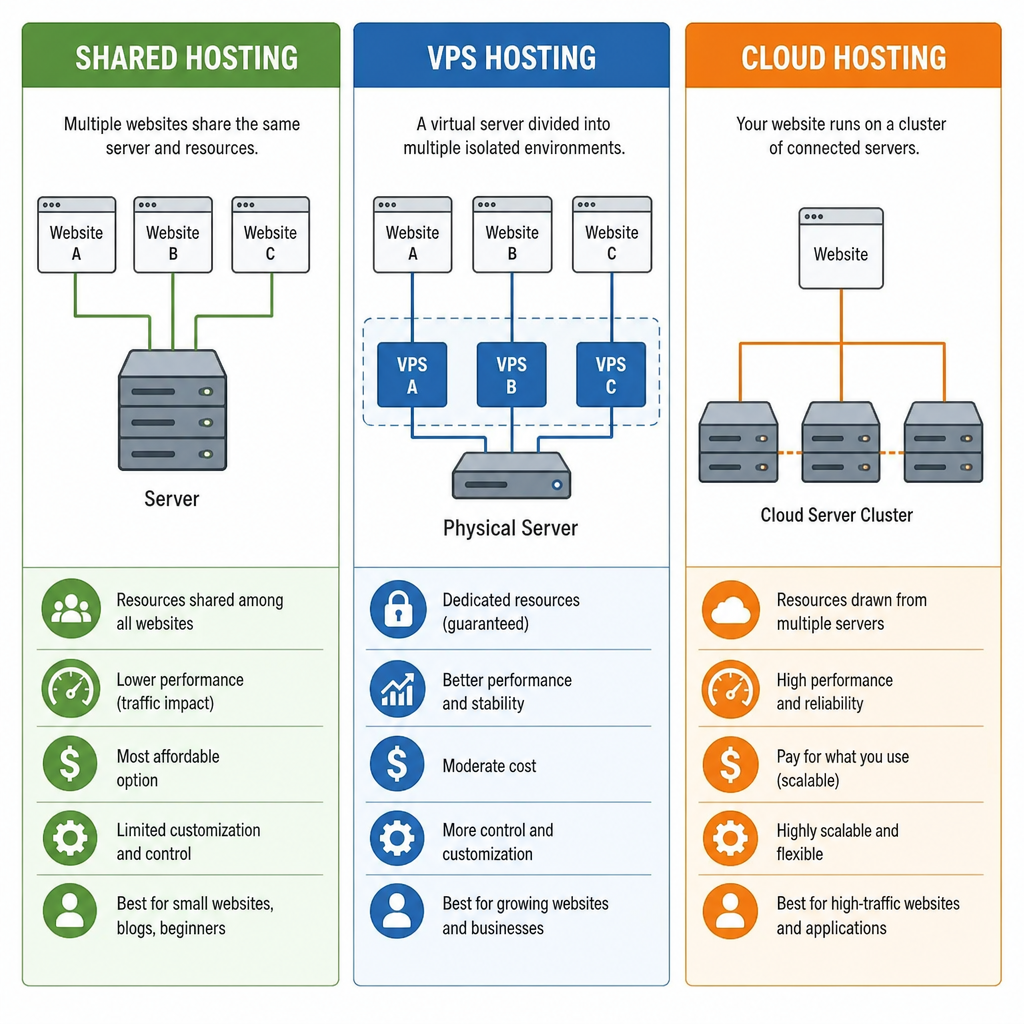
One of the greatest strengths of Linux is its incredible versatility. It scales effortlessly from hosting a simple static webpage to managing complex, high-traffic applications. Here is a breakdown of the primary hosting environments available:
1. Linux Shared Hosting
For beginners and small businesses, linux shared hosting is usually the starting point. In this setup, multiple websites share the resources (CPU, RAM, storage) of a single physical server. Because Linux is exceptionally efficient at managing system resources and isolating user accounts, shared hosting remains stable and highly affordable.
2. Linux VPS Hosting
When your website outgrows shared hosting, linux vps hosting (Virtual Private Server) is the next logical step. Using virtualization technology, a single physical server is divided into multiple virtual servers, giving you dedicated resources and greater control.
If you lack the technical expertise to manage a server yourself, you might wonder what is a managed VPS? A managed VPS means the hosting provider handles the technical heavy lifting—such as OS updates, security patches, and server monitoring—allowing you to focus entirely on your website’s content and business growth.
3. Linux Cloud Hosting
For websites that experience fluctuating traffic spikes, linux cloud hosting offers a modern solution. Instead of relying on a single server, your website draws resources from a vast network of interconnected servers. This provides incredible cloud-based infrastructure scalability. If your site suddenly goes viral, the cloud environment can automatically allocate more resources to keep your site online and fast, ensuring you never miss an opportunity due to server downtime.
4. Linux Server Hosting (Dedicated)
At the top tier is dedicated linux server hosting. This provides you with an entire physical server dedicated solely to your applications. It offers maximum performance, total customization, and the highest level of security, making it the ideal choice for massive enterprise applications and high-traffic e-commerce stores.
The Great Debate: Linux vs Windows Server Comparison
When selecting a hosting environment, you will inevitably encounter the Linux vs Windows server comparison. While both have their merits, Linux is widely considered the superior choice for the vast majority of web projects.
Windows servers are strictly necessary only if your website relies on specific Microsoft technologies, such as ASP.NET, MS SQL, or Microsoft Access. However, if you are using open-source languages and databases—such as PHP, Python, Perl, Ruby, or MySQL—linux web hosting is the native, optimized environment for these technologies.
Linux also boasts a lighter footprint. Without the heavy graphical user interface (GUI) required by Windows, a Linux server dedicates more of its processing power and memory directly to serving your website, resulting in faster load times and better overall performance.
Under the Hood: Distributions, Security, and Control
The power of Linux lies not just in its cost-effectiveness, but in its deep technical capabilities and robust security architecture.
Choosing the Right Distribution
Linux is not a single, monolithic operating system. It comes in various “flavors” known as distributions (or distros). Choosing a distribution for web servers depends on your specific needs. CentOS and AlmaLinux are renowned for their enterprise-grade stability. However, an Ubuntu server for web applications is arguably the most popular choice today. Ubuntu offers a massive repository of pre-compiled software, regular security updates, and extensive community documentation, making it incredibly user-friendly for developers.
Unmatched Security Architecture
When it comes to securing a server environment for websites, Linux is structurally superior. The system was designed from the ground up as a multi-user environment with strict privilege separation.
This brings us to the concepts of root access and user permissions explained. In Linux, the “root” user has absolute control over the system. However, day-to-day tasks and web applications run under restricted user accounts. If a hacker manages to compromise a website running on a Linux server, the strict file permission system usually traps the intruder within that specific user account, preventing them from gaining root access and taking down the entire server.
Remote Management via SSH
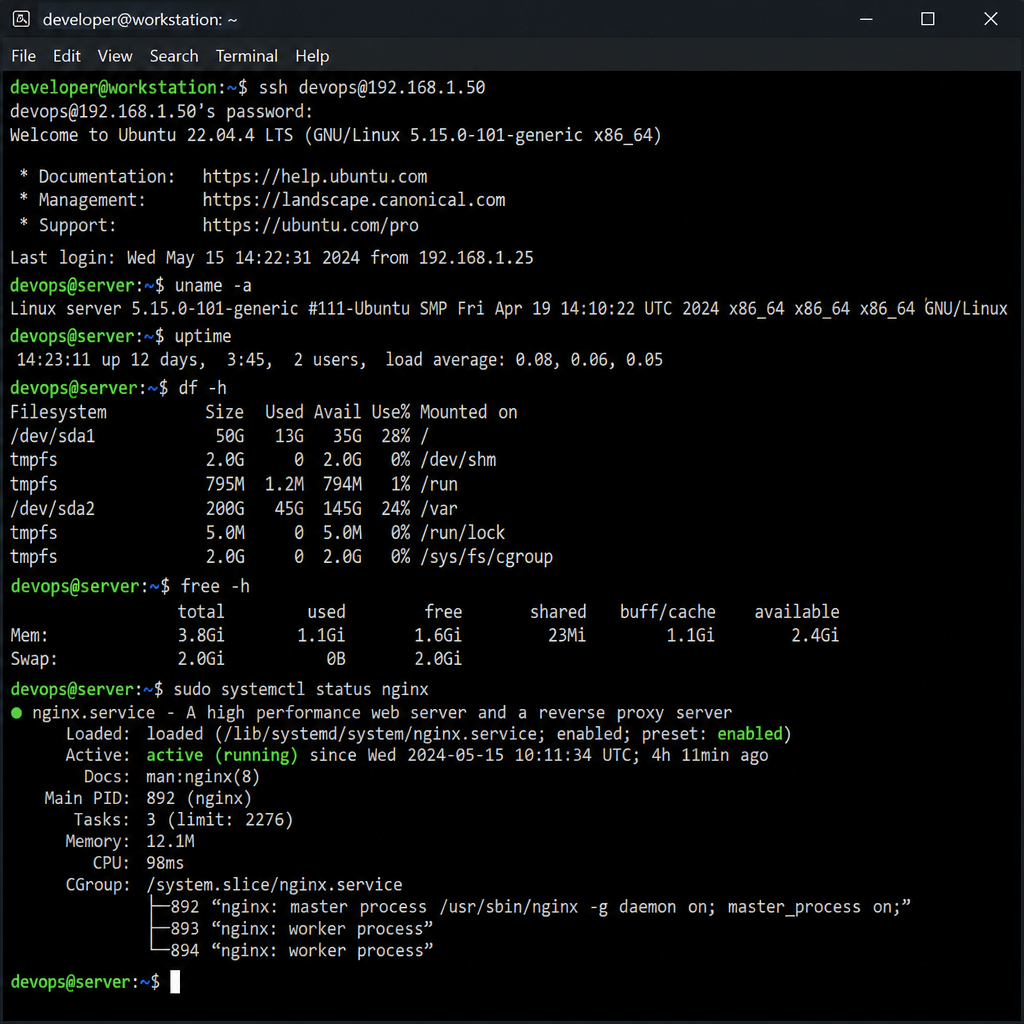
For server administrators, security extends to how the server is accessed. Linux utilizes ssh access for remote management. Secure Shell (SSH) is a cryptographic network protocol that allows you to log into your server remotely over an unsecured network. All data, including passwords and commands, is heavily encrypted, ensuring that malicious actors cannot intercept your sensitive information.
Setup, Management, and Performance Optimization
While Linux has a reputation for being heavily technical, modern tools have made it highly accessible. Whether you prefer clicking through a visual dashboard or typing commands, managing a Linux server has never been easier.
Control Panels: Simplifying Administration
If you prefer a graphical interface, you will likely use a web hosting control panel. The cPanel vs Plesk control panels debate is common among webmasters. cPanel is an industry standard, exclusively available on Linux, and beloved for its straightforward, intuitive interface. Plesk is also highly robust and offers excellent support for WordPress and developer tools. Both panels allow you to manage databases, set up email accounts, and configure domains with just a few clicks.
Mastering the Command Line
For those who want total control and maximum efficiency, the terminal is where the magic happens. While it can seem intimidating, reading a beginner guide to command line interface (CLI) can quickly demystify the process. Learning basic commands to navigate directories, move files, and monitor system resources empowers you to manage your server much faster than you could through a GUI.
Setting Up Your Software Stack
Every website needs a software stack to function. If you are starting fresh, learning how to set up LAMP stack is a foundational skill. LAMP stands for Linux (the operating system), Apache (the web server), MySQL (the database), and PHP (the programming language). Setting up this stack on an Ubuntu server takes only a few simple CLI commands and provides a robust, proven environment capable of running popular Content Management Systems like WordPress, Joomla, or Drupal.
Speed and Performance
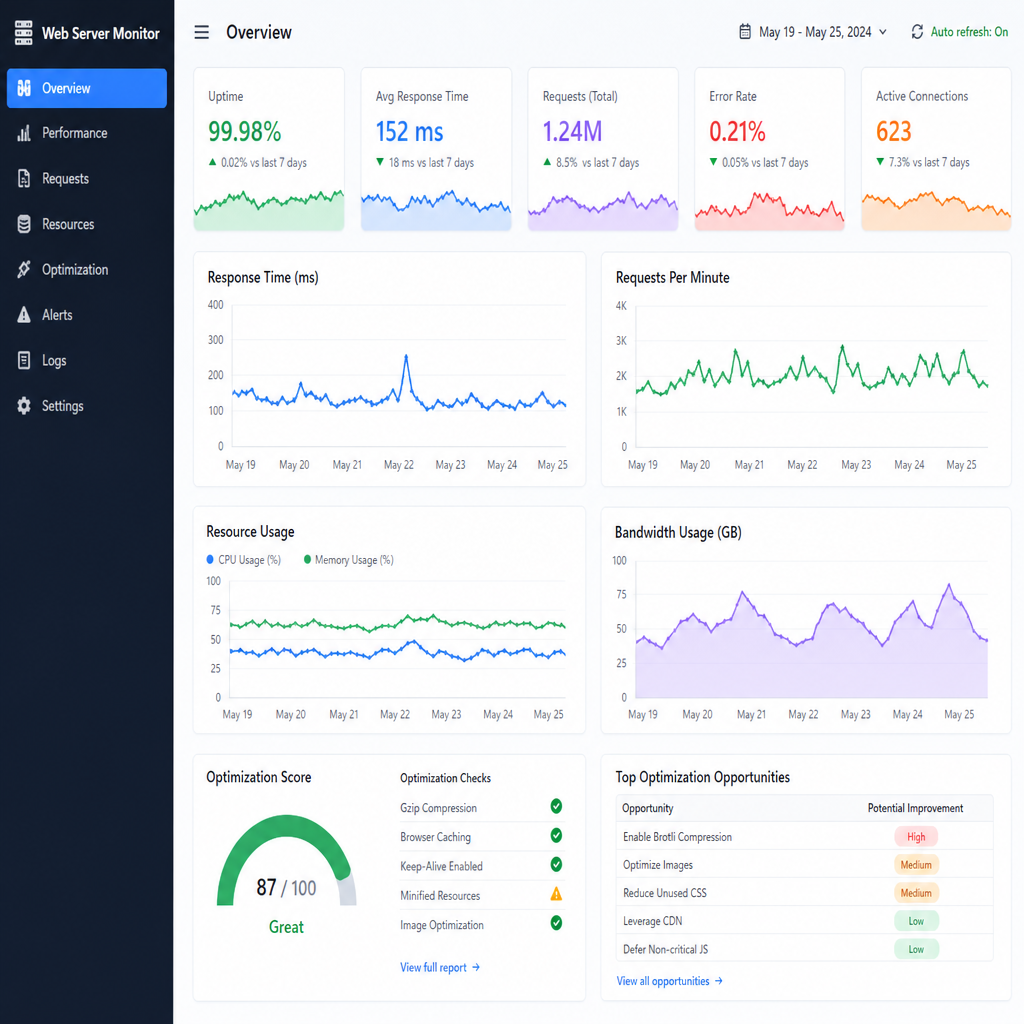
Site speed is a critical factor for user experience and SEO. Optimizing web server performance on Linux is highly customizable. You can easily implement caching mechanisms like Memcached or Redis, switch from Apache to the lightning-fast Nginx web server, or fine-tune your PHP configurations. Linux gives you the granular control required to squeeze every ounce of performance out of your hardware.
Seamless Migrations
Finally, if you are currently unhappy with your hosting provider, migrating website to a new platform is remarkably straightforward on Linux. Because the underlying technologies (like PHP and MySQL) and control panels (like cPanel) are standardized across the industry, moving your files and databases from one Linux host to another can often be done with minimal downtime and without breaking your site’s functionality.
Final Thoughts
The foundation of a successful online presence relies heavily on the technology running quietly in the background. By choosing linux hosting, you are opting for a platform that prioritizes speed, security, flexibility, and cost-efficiency.
Whether you are utilizing affordable shared hosting for a personal project, leveraging a managed VPS for a growing business, or harnessing the power of cloud-based infrastructure scalability, Linux provides the stable, open-source environment required to succeed. By understanding the core advantages—from strict user permissions to vast open-source community support—you can make an informed decision and build your digital presence on the most reliable operating system the web has to offer.
Ready to launch or upgrade your website? Visit Hostinger and compare its hosting plans to find the right option for your needs.
“This article contains affiliate links, meaning we may earn a commission at no additional cost to You “ editorial@BLAK BEIGE