

Imagine building your dream home. Before you can choose the paint colors, arrange the furniture, or invite guests over, you need to purchase a plot of land. In the digital world, your website is your house, and web hosting is the land it sits on.
For anyone launching a new digital project, reading a solid beginner guide to website infrastructure is an essential first step. Without the right foundation, your site might suffer from slow load times, frequent crashes, or security vulnerabilities. Exploring the various types of web hosting is crucial because the choice you make directly impacts your site’s performance, user experience, and bottom line.
Before comparing different providers, it is worth learning how web hosting works and which features matter most when choosing a plan.
In this comprehensive guide, we will break down different web hosting services, conduct a thorough hosting comparison, and help you navigate the complex world of servers so you can find the perfect fit for your specific needs.
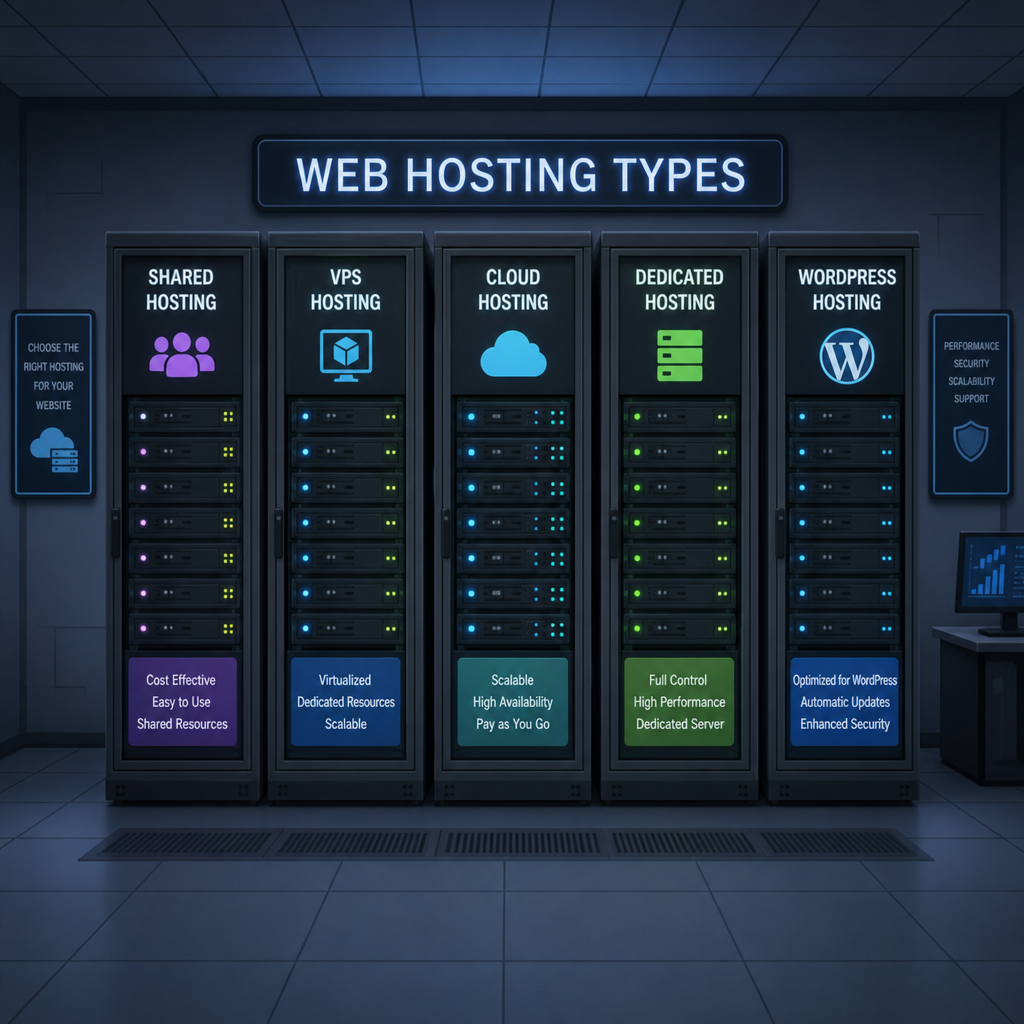
What Are Web Hosting Services?
At its core, web hosting is a service that allows organizations and individuals to post a website or web page onto the internet. A web host, or web hosting service provider, is a business that provides the technologies and services needed for the website or webpage to be viewed online. Websites are hosted, or stored, on special computers called servers.
Let’s dive into the core categories to understand which environment suits your project best.
Shared Hosting: The Budget-Friendly Starter
As the name implies, shared hosting means your website shares a single physical server with hundreds, sometimes thousands, of other websites. Because the server costs are distributed among all the users, this is hands-down one of the most cost effective hosting solutions for startups, bloggers, and small local businesses.
Pros of Shared Hosting:
- Affordability: Typically ranges from $2 to $10 a month.
- Ease of Use: Most providers offer a user-friendly interface.
- Maintenance-Free: The hosting company handles all server maintenance and administration.
Cons of Shared Hosting:
- The “Bad Neighbor” Effect: If another site on your server experiences a massive traffic spike or a security breach, it can slow down or endanger your website.
- Limited Resources: You have strict limits on storage, bandwidth, and processing power.
VPS Hosting: The Middle Ground
If you have outgrown shared hosting but aren’t quite ready for a dedicated physical server, VPS hosting (Virtual Private Server) is the logical next step.
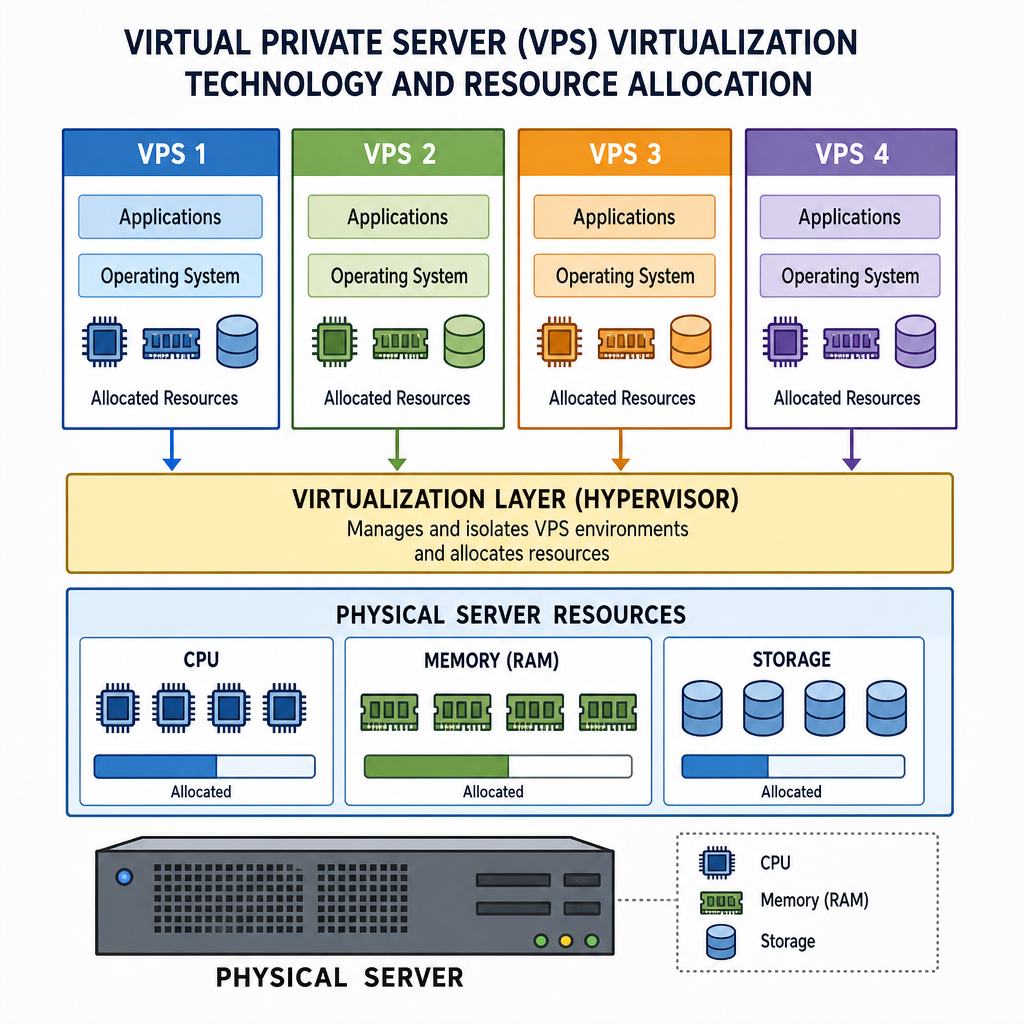
So, what exactly is the difference between shared and VPS hosting? While you still share a physical server with other users in a VPS environment, the host uses virtual private server virtualization technology to partition the server into multiple isolated virtual compartments. You are allocated a dedicated portion of the server’s resources (CPU, RAM, and disk space) that no one else can touch.
Pros of VPS Hosting:
- Reliability: Traffic surges on other websites won’t affect your site’s performance.
- Customization: You generally get root access, allowing you to configure the server environment to your exact specifications.
- Scalability: It is relatively easy to upgrade your resources as your business grows.
Cloud Hosting: Maximum Flexibility
Cloud hosting is rapidly becoming the industry standard due to its remarkable reliability and flexibility. Instead of relying on a single physical server, cloud hosting utilizes a vast network of interconnected virtual and physical servers to host your site.
One of the most significant cloud hosting scalability benefits is the ability to adjust resources on the fly. If your site suddenly goes viral, the cloud network seamlessly pools resources from other servers to handle the traffic spike without downtime. You also only pay for the resources you actually use, making it an incredibly efficient model for businesses with fluctuating traffic patterns.
Dedicated Hosting: Ultimate Power and Control
For enterprise-level organizations and massive e-commerce platforms, dedicated hosting is the gold standard. In this model, you rent an entire physical server exclusively for your website. You don’t share resources with anyone.
Because of the massive processing power it provides, dedicated hosting is undoubtedly the best hosting for high traffic websites. Furthermore, developers love the dedicated server root access advantages. With full administrative control, you can choose your operating system, install custom software, configure advanced security protocols, and optimize the hardware precisely for your applications.
Managed vs. Unmanaged Hosting
As you browse different hosting plans, you will frequently see the terms “managed” and “unmanaged.” This distinction doesn’t refer to the physical server type, but rather the level of support the hosting provider offers.
Managed Hosting
With managed hosting, the provider takes care of the day-to-day management of the hardware, operating systems, and standardized applications. This includes automated backups, malware scanning, performance monitoring, and software updates.
A common dilemma for site owners is choosing between managed WordPress hosting vs unmanaged hosting. If you choose a managed WordPress plan, the host provides an environment specifically optimized for WordPress. They handle core updates, caching, and security, allowing you to focus purely on creating content and running your business. Unmanaged hosting, on the other hand, leaves all the technical upkeep to you—a cheaper option, but one that requires advanced technical expertise.
Specialized Hosting Solutions
Beyond the standard tiers, there are a few specialized hosting models you might encounter:
Reseller Hosting
Many aspiring entrepreneurs ask: what is reseller hosting and how does it work? Reseller hosting allows you to purchase a large block of hosting resources (like disk space and bandwidth) from a parent host, white-label it, and divide it up to sell to your own clients for a profit. It operates like a wholesale business and is highly popular among web design agencies who want to offer hosting as an add-on service to their clients.
Colocation
When dealing with enterprise-level infrastructure, IT professionals often debate colocation vs dedicated hosting pros and cons. In dedicated hosting, you rent the server hardware from the hosting provider. In colocation, you own the physical server hardware, but you rent the physical space, cooling, power, and internet connection in a highly secure data center. Colocation offers maximum hardware control and long-term cost savings for massive enterprises, but it requires substantial upfront capital and a dedicated IT team to physically maintain the machines.

Essential Features to Consider
Understanding the hardware is only half the battle. When performing a hosting comparison, you must look closely at the fine print and technical features. Here is how to choose the right hosting plan for small business success:
1. Robust Security Protocols
Your website’s security is non-negotiable. Some critical web hosting security features to look for include:
- Free SSL Certificates: To encrypt data passed between your site and your visitors.
- Automated Backups: Daily backups ensure you can restore your site if disaster strikes.
- Web Application Firewalls (WAF): To block malicious traffic before it reaches your site.
- DDoS Protection: To keep your site online during coordinated brute-force attacks.
2. IP Address Options
You might wonder: why do I need a dedicated IP address? While most shared hosting plans use a shared IP (meaning multiple websites use the same IP address), a dedicated IP is unique to your site. You might need one if you are running custom software that requires a unique IP, if you manage a high-volume email marketing server and want to protect your sender reputation from “bad neighbors,” or if your site requires specific third-party SSL certificates.
3. Reliability and Support
Every minute your website is down, you lose potential revenue and credibility. Pay close attention to uptime guarantees and service level agreements (SLAs). A good host will guarantee at least 99.9% uptime and will explicitly state in their SLA how they will compensate you (usually via account credits) if they fail to meet that benchmark. Additionally, 24/7 customer support via live chat or phone is essential for quick troubleshooting.
4. Server Management Tools
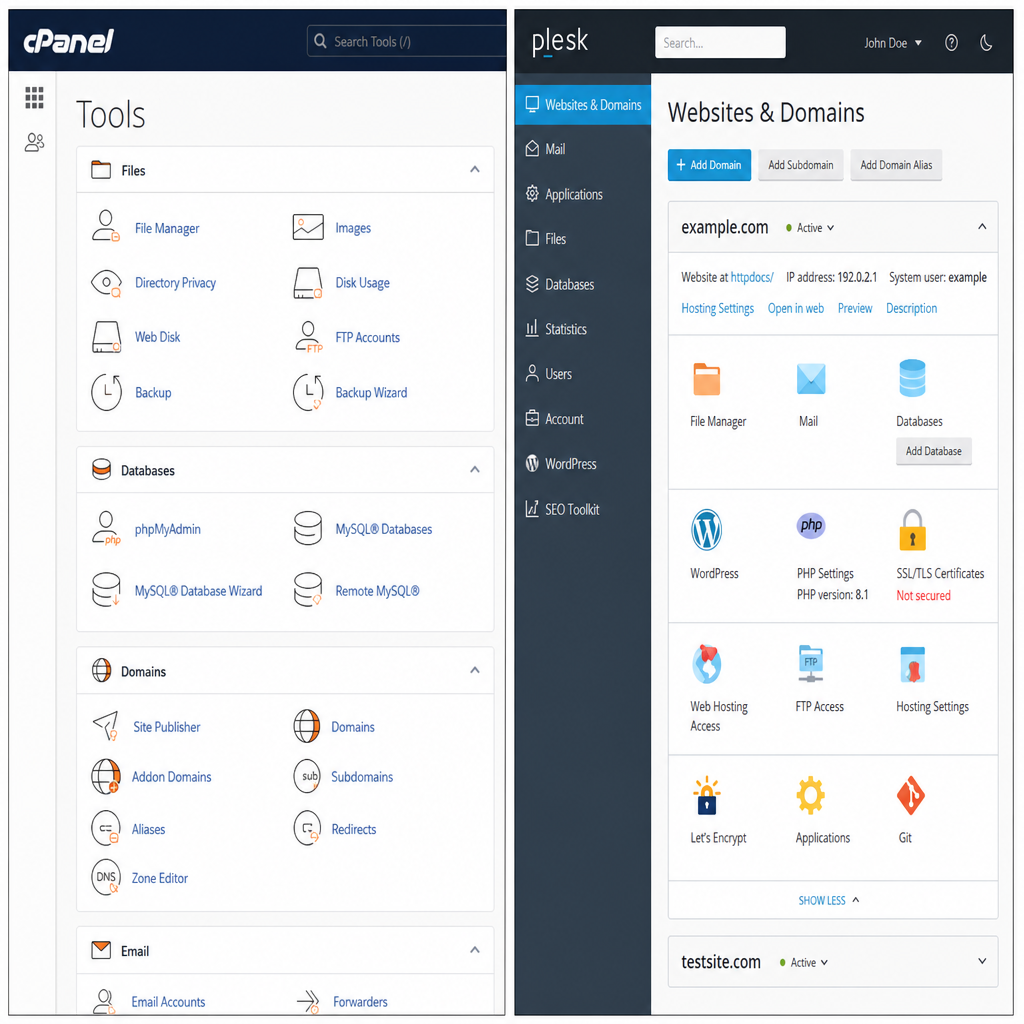
Unless you are a command-line wizard, you will need a graphical interface to manage your website, files, databases, and emails. Evaluate the control panel options like cPanel and Plesk. cPanel is highly popular for Linux-based servers, offering an intuitive dashboard for beginners and experts alike. Plesk is a robust alternative that works exceptionally well for both Linux and Windows servers. A familiar, user-friendly control panel saves hours of frustration.
Conclusion: Making Your Decision
Choosing the perfect web host is not a one-size-fits-all scenario.
If you are just launching a personal blog or a local business site, shared hosting is the perfect starting point. As your traffic grows, graduating to VPS or cloud hosting will provide the necessary resources and scalability to keep your site running smoothly. Finally, if you are managing a massive enterprise platform or demanding applications, dedicated hosting provides the raw power and control you require.
Take the time to evaluate your technical expertise, your budget, and your long-term growth projections. By prioritizing strong security features, reliable uptime guarantees, and the right level of management support, you can establish a robust digital foundation that empowers your website to thrive for years to come.
Ready to launch or upgrade your website? Visit Hostinger and compare its hosting plans to find the right option for your needs.
“This article contains affiliate links, meaning we may earn a commission at no additional cost to You “ editorial@BLAK BEIGE