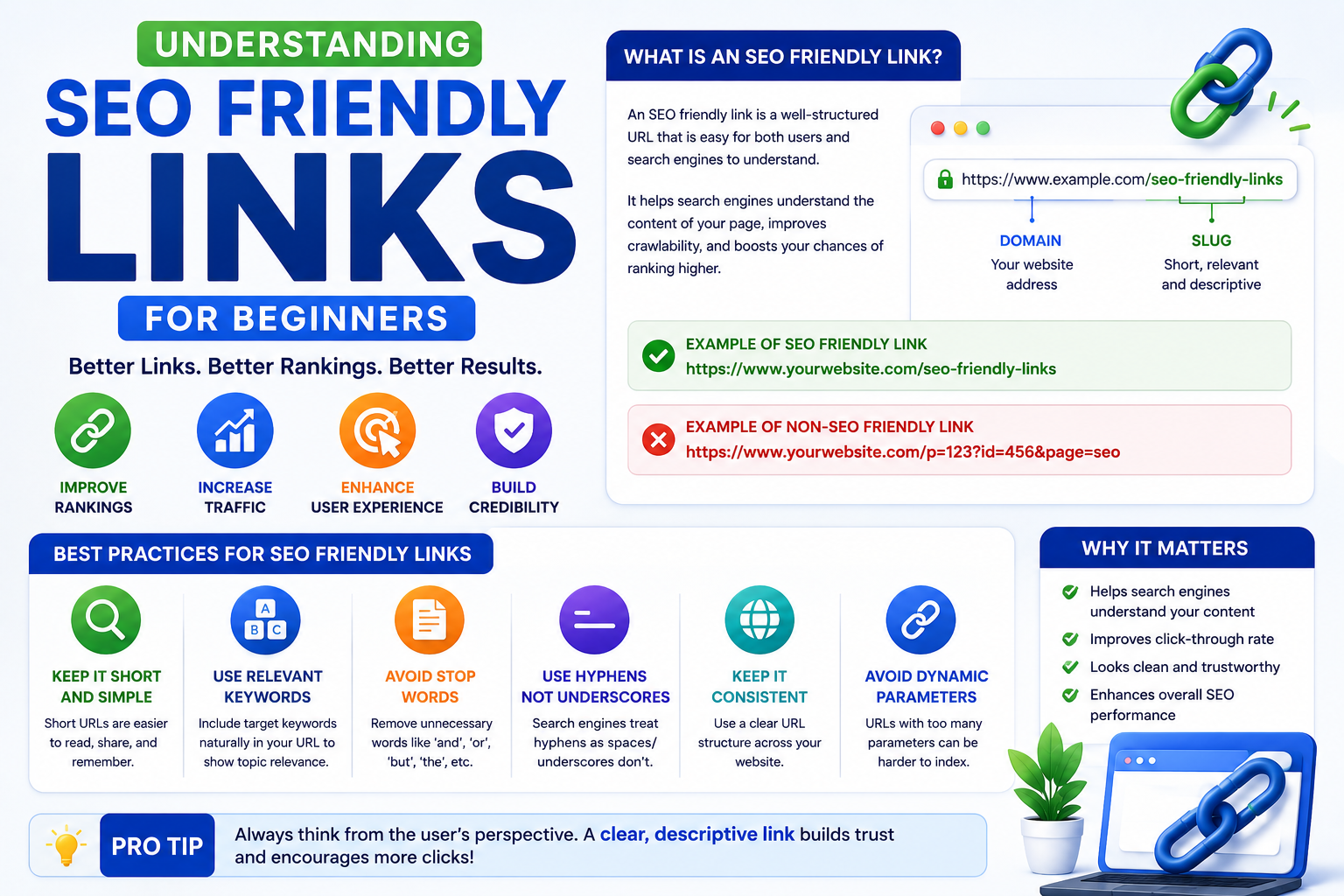
Understanding SEO Friendly Links for Beginners
Have you ever tried to share a webpage with a friend, only to copy a massive, unreadable string of numbers, letters, and special characters? Not only is that confusing for humans, but it’s also confusing for search engines.
If you want your website to rank well on Google, Bing, and other search engines, you need to master the art of seo friendly links.
Table of Contents
A link is much more than just a pathway from one page to another. It provides critical context, establishes hierarchy, passes authority, and significantly improves the user experience. Whether you are formatting the actual web address of your page or creating hyperlinks within your text, understanding how links work is foundational to SEO.
Let’s break down everything beginners need to know about creating, managing, and optimizing links to boost search visibility.
The Anatomy of a Perfect Web Address
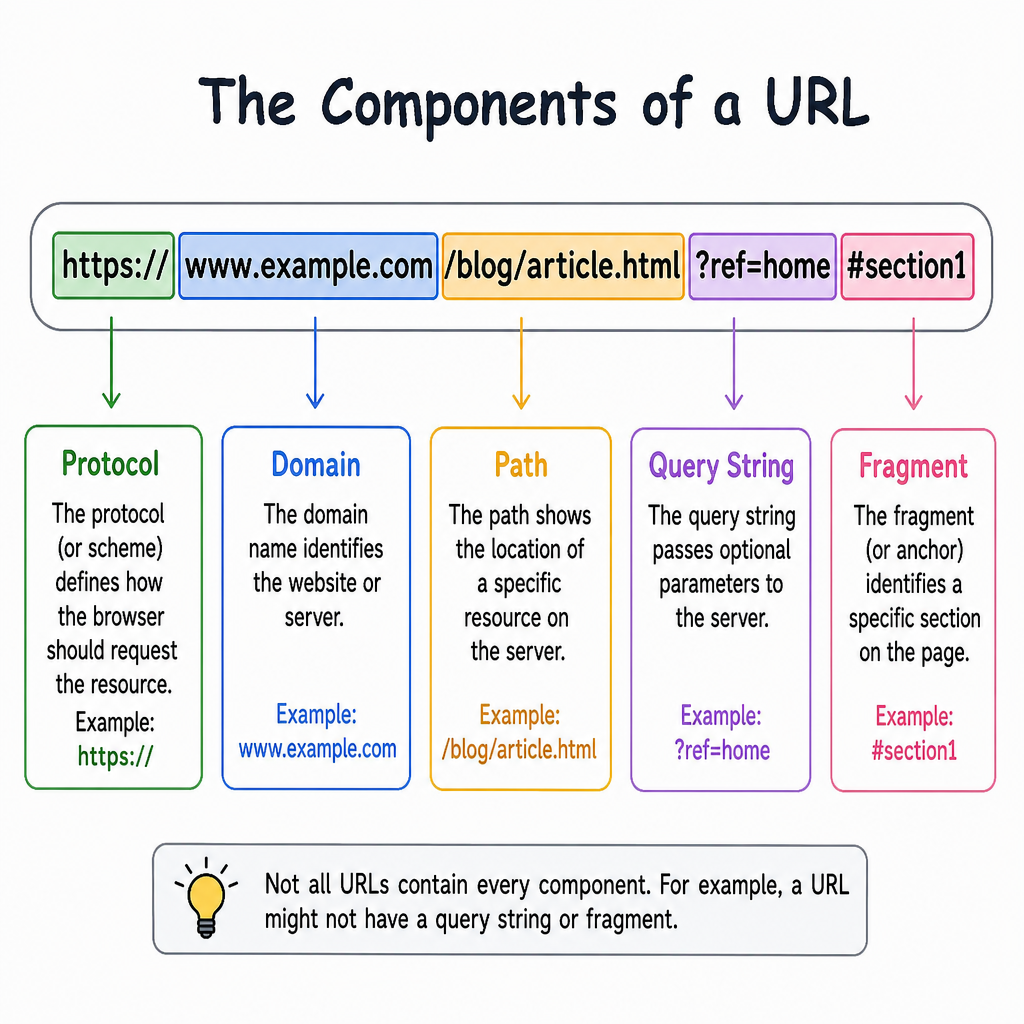
Before we talk about hyperlinks in your content, we need to look at the web addresses themselves. The way you format your website’s addresses—known as your url structure—is one of the most fundamental aspects of technical SEO.
Crafting an SEO Friendly URL
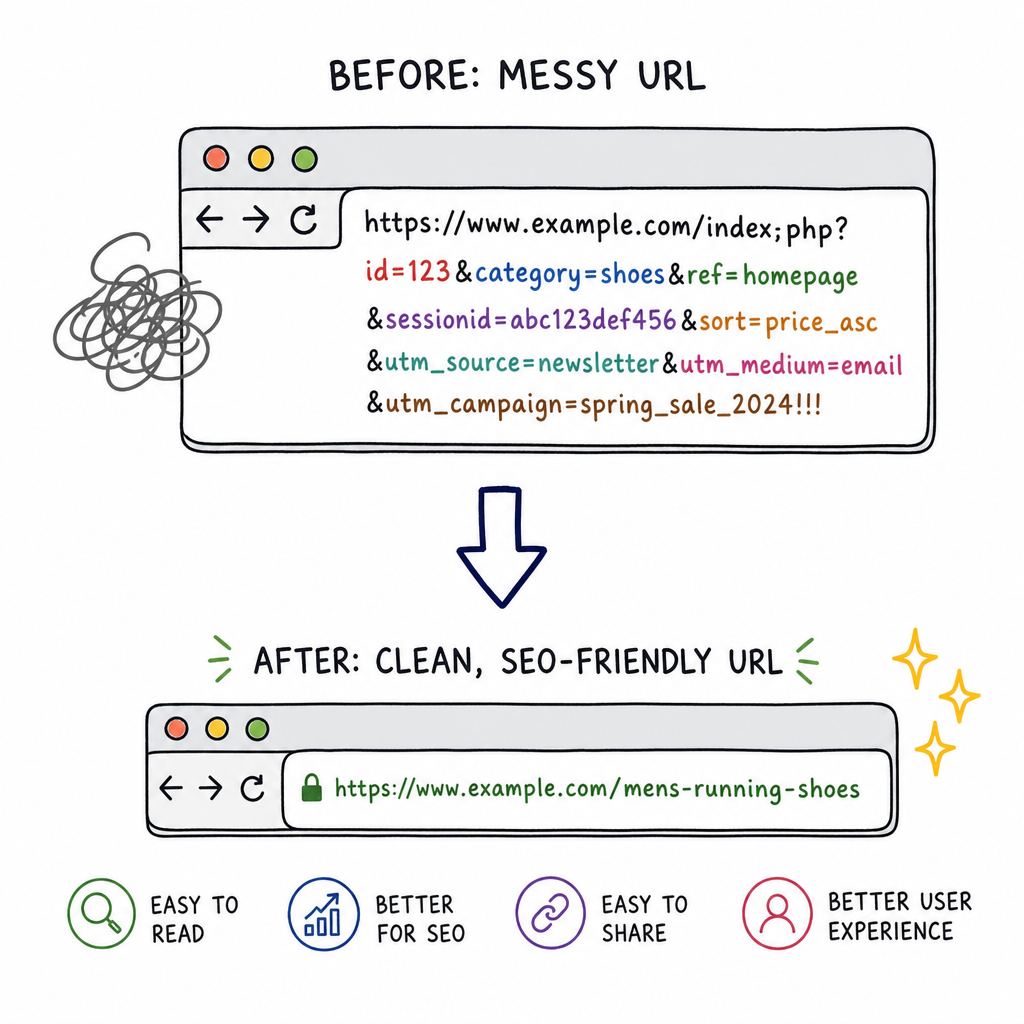
An seo friendly url is concise, highly readable, and clearly describes the content of the page. When search engine bots crawl your site, the URL is one of the first indicators they use to understand what your page is about. Therefore, designing a proper search engine optimization url is a crucial first step.
Here is a quick comparison:
- Bad: www.yourwebsite.com/post?id=8675309&category=x
- Good: www.yourwebsite.com/blog/seo-friendly-links
Integrating Keywords into Your Paths
One of the easiest wins in url seo is including your primary target phrase in the page’s web address. Using a keyword in url seo strategies helps signal the page’s topic to both users and algorithms.
However, when placing keywords in urls, avoid keyword stuffing. Simply use the primary topic. For example, if you are writing about dog training tips, /dog-training-tips is perfect.
To establish the best practices for URL structure, follow these rules:
- Use hyphens, not underscores: Search engines read hyphens as spaces between words.
- Use lowercase letters: Case sensitivity can sometimes create duplicate pages.
- Keep it clean: Remove “stop words” like a, an, the, and, but.
Finding the Sweet Spot for Length
When designing your url structure for seo, pay close attention to length. The optimal URL length for search visibility is generally between 50 and 60 characters. Shorter URLs are easier to read, easier to share on social media, and are fully visible in search engine result pages (SERPs) without getting truncated.
Mastering Hyperlinks: Internal and Site Architecture
Once your page addresses are optimized, the next step is connecting them. How you link your pages together dictates how search engines crawl and understand your website.
Guiding the User and the Bot
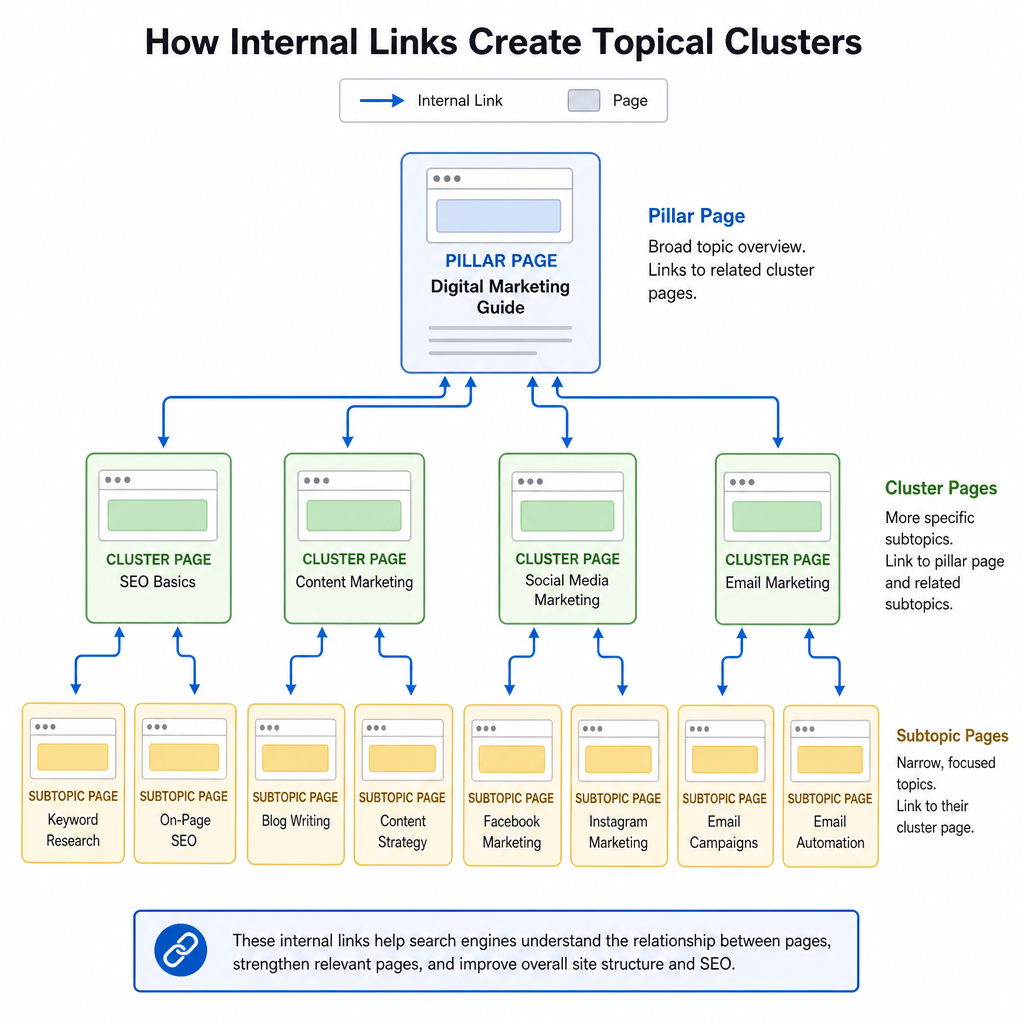
A primary goal of SEO is creating logical site navigation architecture. Your website should resemble a well-organized filing cabinet, where broad topics sit at the top, branching down into more specific subtopics.
A major component of this architecture is breadcrumb navigation best practices. Breadcrumbs are those little text paths (usually at the top of a page) that look like this: Home > Blog > SEO > Link Building. They not only help users find their way back to previous sections but also provide search engines with a clear map of your site’s hierarchy.
Internal Linking Strategies
An effective internal linking strategy for topical authority involves connecting related pieces of content on your own website. If you write a comprehensive guide on digital marketing, you should link out to your specific articles on social media, email marketing, and SEO. This creates a “web” of relevance, showing Google that you are a comprehensive expert on the subject.
Absolute vs. Relative Links
When setting up internal links, developers often debate the difference between absolute and relative URLs.
- Absolute URLs include the entire web address (e.g., https://www.example.com/about).
- Relative URLs only include the path (e.g., /about).
While relative URLs can make site migrations easier, using absolute URLs is generally safer for SEO. It prevents scraper sites from stealing your content and accidentally linking back to themselves, and it avoids technical glitches with duplicate content.
The Power of Anchor Text and Context
The clickable text of a hyperlink is called “anchor text.” This text is incredibly valuable real estate for SEO.
Being Descriptive and Accessible
You should always practice descriptive anchor text optimization. Never use generic phrases like “click here,” “read more,” or “this post.” Instead, the clickable text should accurately describe the destination page. For instance, instead of saying, “Click here to read our SEO guide,” use “Read our comprehensive SEO guide.”
This practice ties directly into optimizing hyperlink text for screen readers. Visually impaired users rely on screen reader software to navigate websites. These programs often pull up a list of all the links on a page. If every link says “click here,” the user has no idea where those links go. Making your links accessible inherently makes them more SEO-friendly.
The Words Around the Link
Search engines don’t just look at the anchor text; they look at the semantic relevance of surrounding content. If you have a link with the anchor text “apple,” Google looks at the sentences before and after it to determine if you are linking to an orchard, a fruit recipe, or a multinational technology company. Always ensure your links are placed in highly relevant, context-rich paragraphs.
Trust, Authority, and External Links
Links are the currency of the web. How you link to others, and how others link to you, drastically affects your search rankings.
Navigating Outbound Links
Don’t be afraid to link out to other websites! In fact, the impact of outbound links on E-E-A-T (Experience, Expertise, Authoritativeness, Trustworthiness) is highly positive. When you cite your sources and link to authoritative, highly trusted websites (.edu, .gov, or major industry publications), you signal to search engines that your content is well-researched and trustworthy.
Dofollow vs Nofollow Links
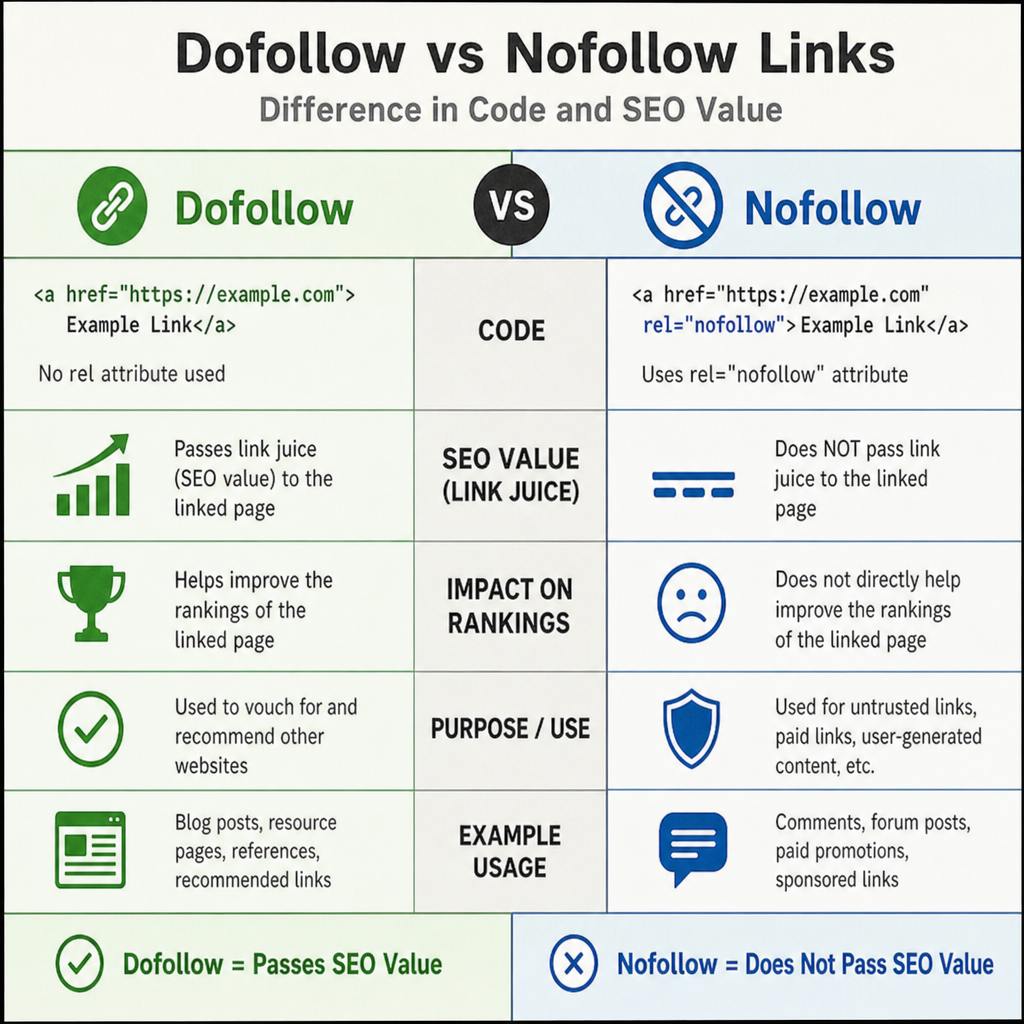
When you link to another site (or they link to you), the link can carry an attribute that tells search engines how to treat it. Understanding the dofollow vs nofollow impact on ranking is essential.
- Dofollow links: These are standard links. They pass “link equity” (or SEO value/trust) from one site to another.
- Nofollow links: These contain a small piece of HTML code (rel=”nofollow”) telling search engines not to pass SEO value. These are typically used for sponsored content, affiliate links, or user-generated content like blog comments.
Earning Backlinks Naturally
When other websites link to you, it acts as a vote of confidence. However, search engines are smart enough to spot fake or purchased links. You must focus on natural link profile building techniques. This means earning links organically by creating high-quality, shareable content, guest posting on reputable industry blogs, creating original research or infographics, and networking with other webmasters.
Maintenance: Keeping Your Links Healthy
A great link strategy requires ongoing maintenance. As your website grows, pages will be deleted, moved, or updated, which can lead to a messy link profile if left unchecked.
Taming Broken Links
Nothing ruins a user’s experience quite like clicking a link and hitting a 404 Error page. Identifying and fixing broken backlinks should be a routine part of your website audits. You can use free and paid SEO tools to scan your site for broken internal and external links. Once found, either update the link to a live page or remove the hyperlink entirely.
Redirects and Link Value
If you permanently move a page to a new URL, you need to set up a 301 redirect. Managing 301 redirects for link equity ensures that any backlink value the old URL accumulated is smoothly passed on to the new URL. Without a 301 redirect, all the SEO authority built by the old page vanishes into thin air.
Handling Duplicate Content
Sometimes, your website might generate multiple URLs that point to the same content (often caused by e-commerce product filters or tracking tags). To fix this, you must learn how to use canonical tags correctly. A canonical tag is a snippet of HTML code that tells search engines, “Out of all these similar pages, this is the master version I want you to rank.” This consolidates your link equity and prevents your own pages from competing against each other in the search results.
Conclusion
Mastering the use of seo friendly links is an ongoing process, but it is one of the most rewarding investments you can make in your website’s digital marketing strategy.
By starting with a clean, descriptive URL structure, utilizing smart internal linking, writing descriptive anchor text, and regularly maintaining your link health, you build a website that both users and search engine algorithms will love. Remember, the ultimate goal of SEO is to provide a seamless, authoritative, and helpful experience. Treat your links as the vital pathways they are, and watch your search visibility soar.
Actionable Takeaway: Take 15 minutes today to look at your website’s top 5 most important pages. Check their URLs for readability, ensure their internal anchor text is descriptive, and run a quick scan to make sure they contain zero broken links!
Read more : Boost your search position