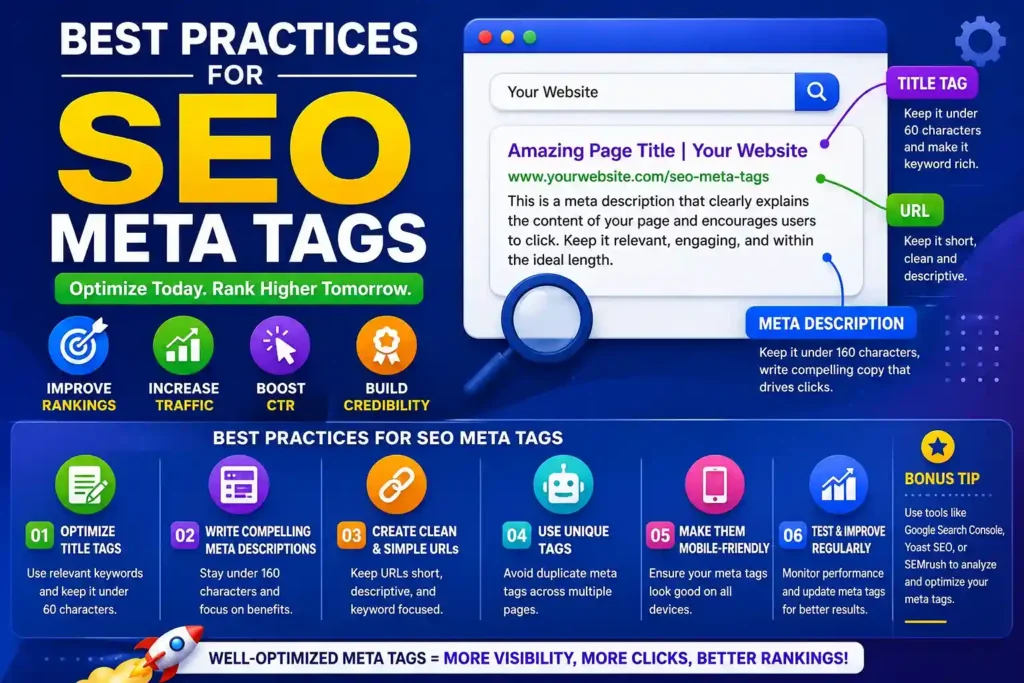
If you want your website to rank higher and attract more visitors, having stellar content is only half the battle. The other half involves ensuring search engines and human users can instantly understand exactly what your content is about. This is where seo meta tags come into play.
Table of Contents
Operating quietly behind the scenes in your website’s code, these snippets possess massive power to influence your search engine rankings and user behavior. Implementing seo meta tags best practices is arguably one of the most effective, high-ROI tasks in digital marketing. Whether you are a beginner or a seasoned marketer, mastering these elements is essential for digital success.
What Are Meta Tags?
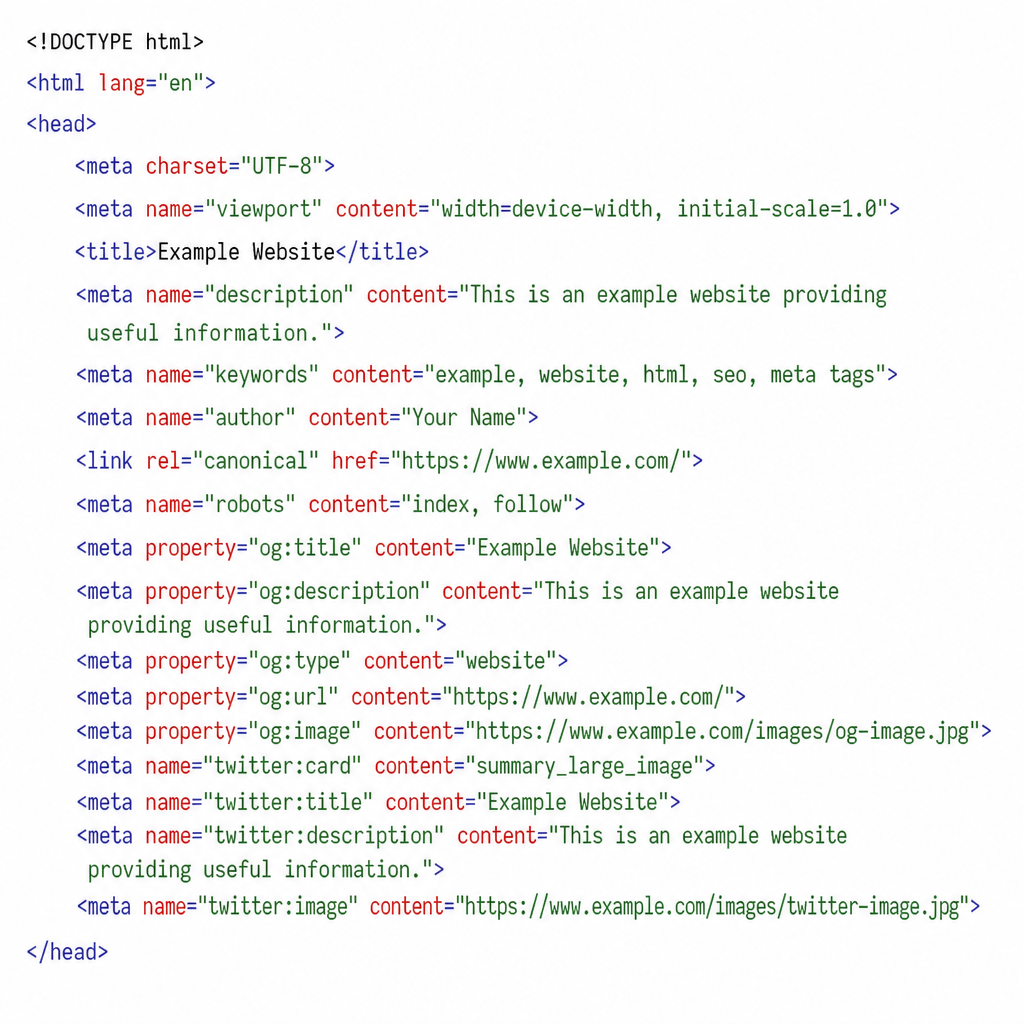
Let’s start with the foundation: what are meta tags? Simply put, they are small snippets of text that describe a web page’s content. Unlike the text visible to users on your actual web page, meta tags only exist in the HTML code—specifically in the <head> section of the document.
They act as a direct line of communication between your website and search engine crawlers (like Googlebot). If you are wondering how to use meta tags for seo, the core principle is straightforward: provide accurate, concise, and highly relevant information to help search engines categorize and display your pages effectively on the Search Engine Results Pages (SERPs).
Title Tags: Your Critical First Impression
The title tag is arguably the single most important meta tag on your page. It dictates the clickable blue link that appears in Google search results.
A common point of confusion for beginners is the title tag vs h1 tag difference. While they often contain similar text, they serve different purposes. The title tag lives in the HTML head and shows up in search engines and browser tabs. The H1 tag, on the other hand, is the main visible headline on the actual webpage itself. Both need to be optimized, but they do not have to be exactly identical.
Best Practices for Title Tags
- Watch your length: The optimal title tag length for google is typically between 50 to 60 characters (or around 600 pixels). If you go over this limit, search engines will truncate your title with an ellipsis (…), which can cut off vital information.
- Front-load your target keyword: Place your most important keywords as close to the beginning of the title as naturally possible.
- Include your brand name: Append your brand at the end of the title (e.g., “Best Running Shoes for Men | ShoeBrand”) to build brand awareness.
Mastering the SEO Meta Description
The meta description is the short paragraph of text that appears directly below your title tag in the search results. While Google has stated that the seo meta description does not directly act as a ranking factor, it plays a massive role in user behavior.
Understanding the impact of metadata on click through rate (CTR) is crucial. A well-written description acts as an organic advertisement, convincing the searcher to click your link instead of a competitor’s. Higher CTRs can lead to more traffic and send positive engagement signals to search engines.
How to Write Compelling Meta Descriptions
Learning how to write compelling meta descriptions comes down to blending copywriting with relevance.
- Keep it concise: Aim for 150-160 characters so it displays perfectly on desktop and mobile.
- Include a Call-To-Action (CTA): Encourage the user to act with phrases like “Learn more,” “Shop now,” or “Read our guide.”
- Match user intent: Ensure the description accurately reflects the content of the page.
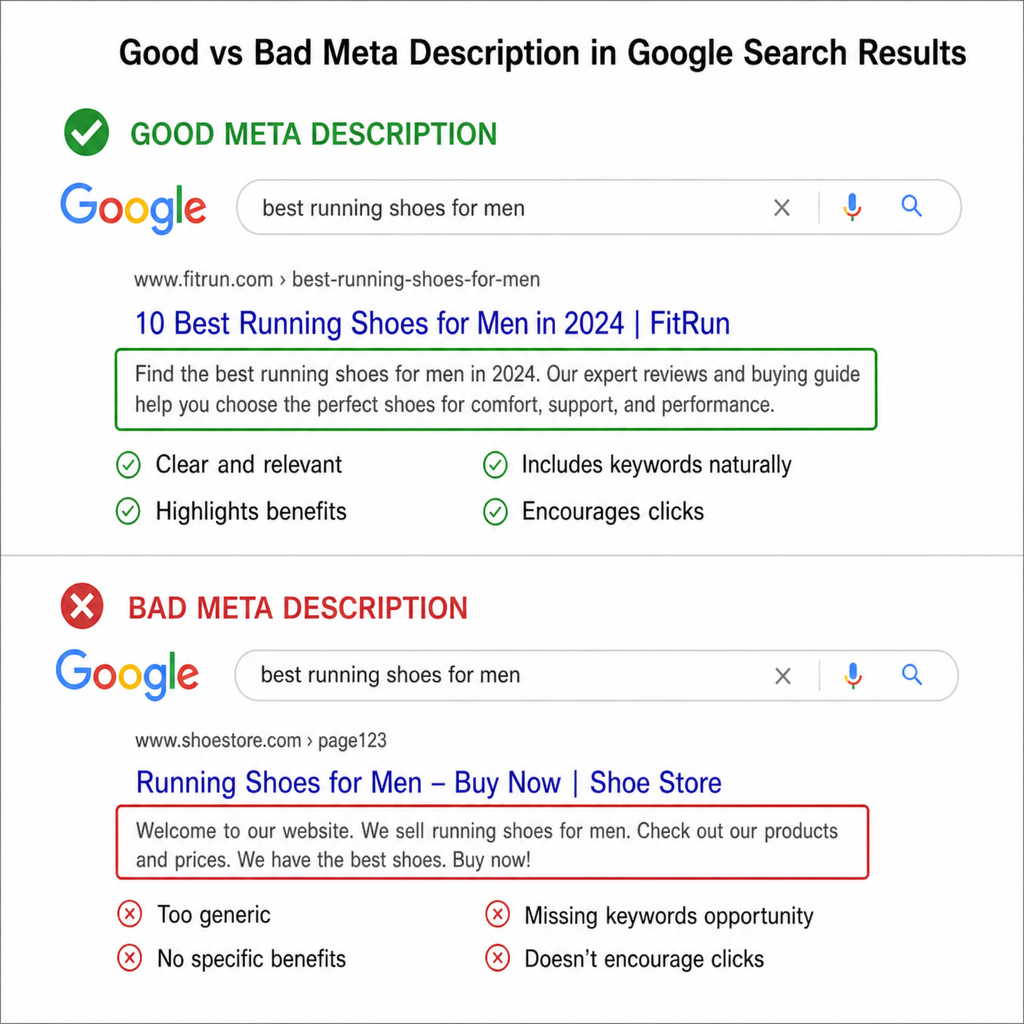
Let’s look at a practical meta description example.
- Bad Example: “We sell shoes. Buy our running shoes today. They are very good and cheap.” (Boring, repetitive, lacks a clear CTA).
- Good Example: “Looking for the perfect running shoes? Browse our collection of lightweight, durable men’s running sneakers. Enjoy free shipping on orders over $50. Shop now!” (Engaging, highlights benefits, clear CTA).
The Truth About Meta Keywords
A question that frequently pops up in SEO circles is: are meta keywords still relevant for seo? The short, definitive answer is no.
Back in the early days of search engines, webmasters used the keywords tag to tell search engines exactly what the page should rank for. A classic meta tag keywords example from the late 90s would look like this: <meta name=”keywords” content=”shoes, buy shoes, red shoes, best shoes”>.
Unfortunately, this system was heavily abused through keyword stuffing. As a result, Google officially deprecated the meta keywords tag in 2009. Today, using it is a waste of time and, in some cases, might even be viewed as a spam signal by smaller, alternative search engines. Skip the keywords tag entirely and focus on placing keywords naturally within your content.
Controlling Crawlers: Robots and Canonical Tags
Advanced SEO requires you to guide search engines on how they should treat your pages. This is primarily done through robots tags and canonical tags.
Utilizing Robots Meta Tags
Understanding how to use robots meta tags correctly ensures you don’t accidentally deindex a crucial page or allow search engines to index private information. This tag is placed in the <head> and gives instructions to web crawlers.
- index, follow: The default setting. Tells the crawler to index the page and follow all links on it.
- noindex: Tells the search engine not to include this page in search results (useful for thank-you pages, login portals, or staging sites).
- nofollow: Tells the search engine not to pass authority to the links on this page.
Canonical Tags and Duplicate Content
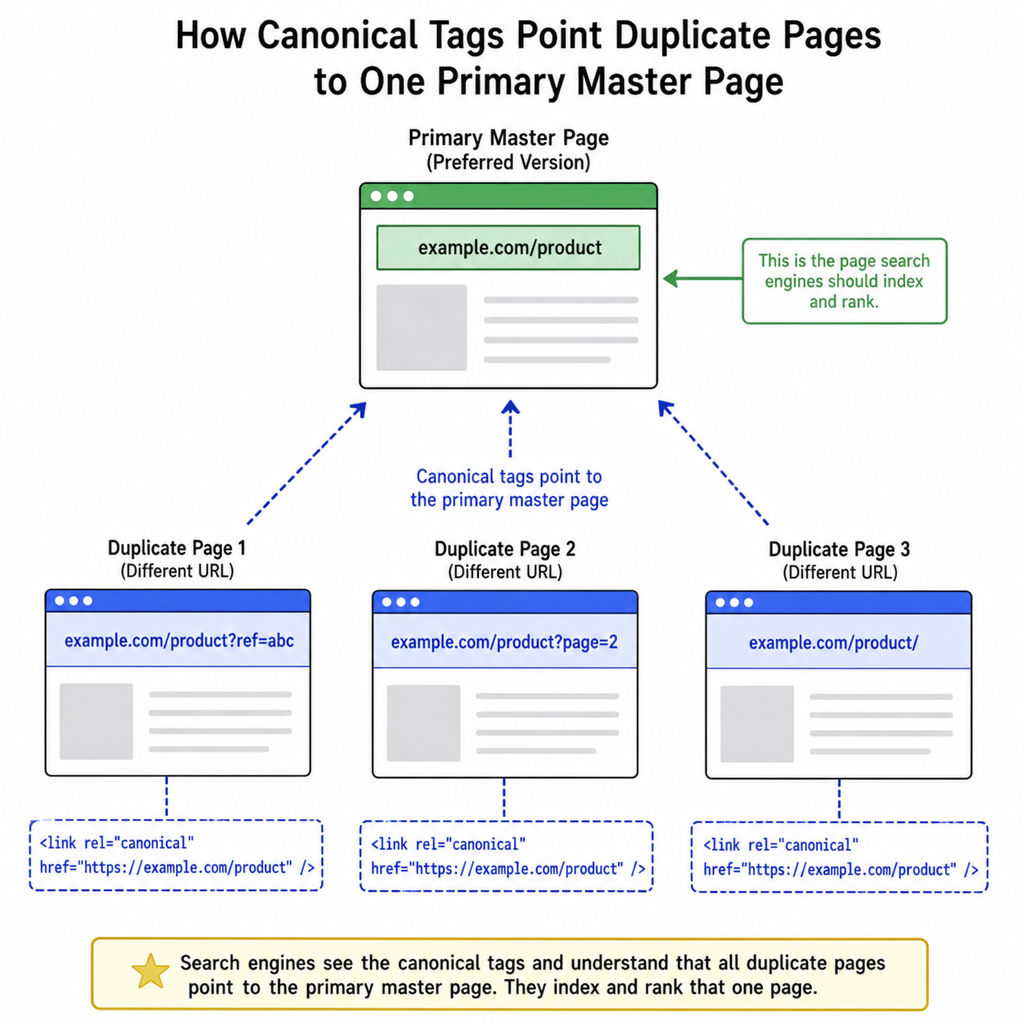
Duplicate content can severely dilute your ranking power. If you are struggling with fixing duplicate title tags and descriptions—often caused by CMS architectures generating multiple URLs for the same page—the canonical tag is your best friend.
A step by step guide to canonical tags starts with identifying the “master” version of a page. If you have yoursite.com/shoes and yoursite.com/shoes?color=red that feature identical content, you must add a canonical tag to the variant page pointing to the master URL: <link rel=”canonical” href=”https://yoursite.com/shoes” />. This consolidates link equity and tells Google exactly which version to rank.
Going Global and Mobile
As search behavior evolves, your meta tags must adapt to different devices and geographic locations.
Mobile Optimization
Mobile searches now dominate internet traffic. Therefore, optimizing head tags for mobile search is a non-negotiable best practice. The most critical tag here is the viewport meta tag: <meta name=”viewport” content=”width=device-width, initial-scale=1.0″>. Without this tag, mobile browsers will render your page at desktop width, forcing users to pinch and zoom, resulting in a terrible user experience and a negative signal for Google’s mobile-first indexing.
International SEO
If your business caters to an international audience, implementing hreflang for multilingual sites is vital. Hreflang attributes tell Google which language and regional version of a page to serve to a specific user. For example, you can designate one URL for English speakers in the UK (en-GB) and another for English speakers in the US (en-US). This prevents your localized pages from competing against each other and ensures a personalized user experience.
Social Media and Advanced Markup
SEO isn’t just about search engines anymore; it’s about how your content appears across the entire web ecosystem, including social platforms.
Open Graph and Twitter Cards
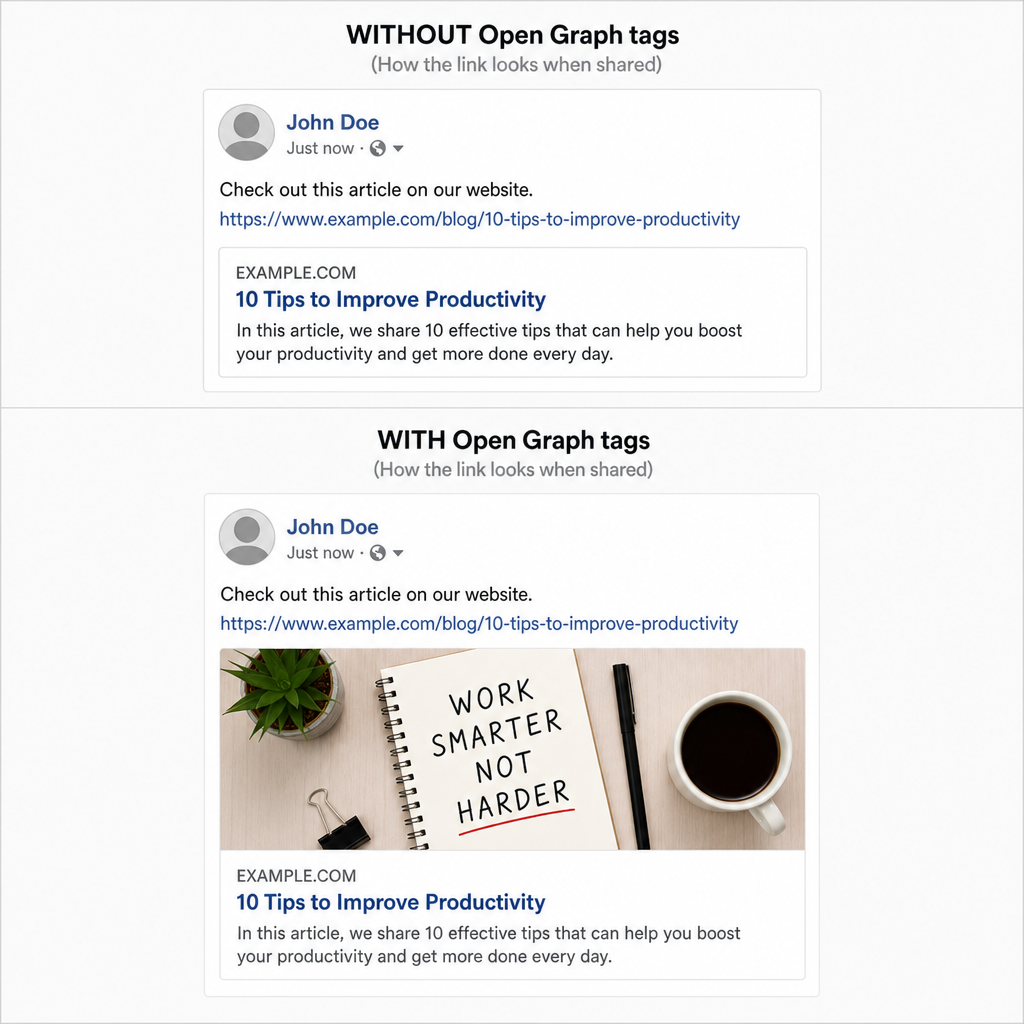
Enhancing social media sharing with open graph (OG) tags ensures your links look attractive when shared on platforms like Facebook and LinkedIn. Without OG tags, social platforms will randomly scrape an image and text from your page, often resulting in a messy display. By defining og:title, og:description, and og:image, you maintain total control over your digital brand.
If you are looking for an og tags vs twitter cards comparison, they function very similarly but cater to different platforms. While Open Graph is the standard for Facebook and LinkedIn, Twitter uses its own proprietary meta tags (e.g., twitter:card=”summary_large_image”). However, as a best practice, if Twitter cannot find its own tags, it will default to reading your Open Graph tags. Implementing both ensures maximum compatibility across all networks.
Structured Data
While technically JSON-LD scripts rather than traditional HTML meta tags, structured data and schema markup integration live right alongside your metadata in the head of your document. Schema markup translates your content into a highly structured format that search engines easily digest.
By utilizing schema, you open the door to improving organic traffic with rich snippets. Rich snippets enhance your standard search listing with eye-catching elements like star ratings, recipe cooking times, product prices, or event dates. These visual enhancements dramatically boost CTR and give you a distinct competitive edge on the SERPs.
Validating Your Metadata Before Launch
Before pushing changes live, it is highly recommended to use serp preview tools for metadata. These free online tools allow you to input your proposed title tag and description to see exactly how they will look on Google’s desktop and mobile search results. This ensures your titles aren’t cut off and your descriptions are visually appealing. Furthermore, utilizing site audit tools can help you catch missing metadata across your entire domain on an ongoing basis.
Conclusion
Metadata may be invisible to the naked eye of a casual website visitor, but it acts as the vital architectural blueprint for search engines and social algorithms. By understanding the optimal lengths, writing persuasive copy, properly managing crawler behavior, and utilizing advanced markup for social and rich snippets, you set your content up for maximum visibility.
Continuously auditing your site and applying these best practices will not only improve your technical SEO foundation but also directly contribute to higher rankings, better click-through rates, and ultimately, a more successful digital presence.
Read more on improving your search engine positions