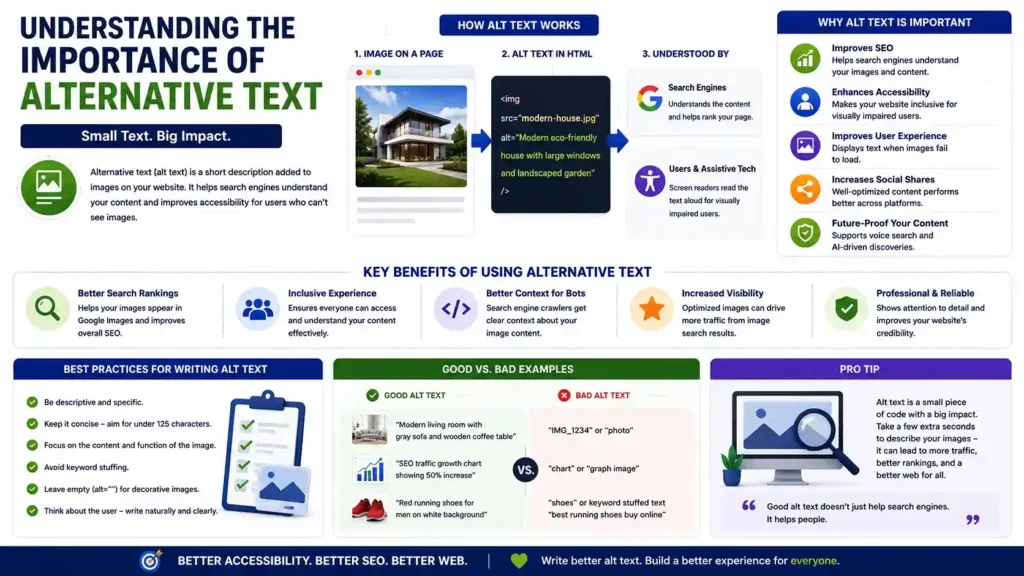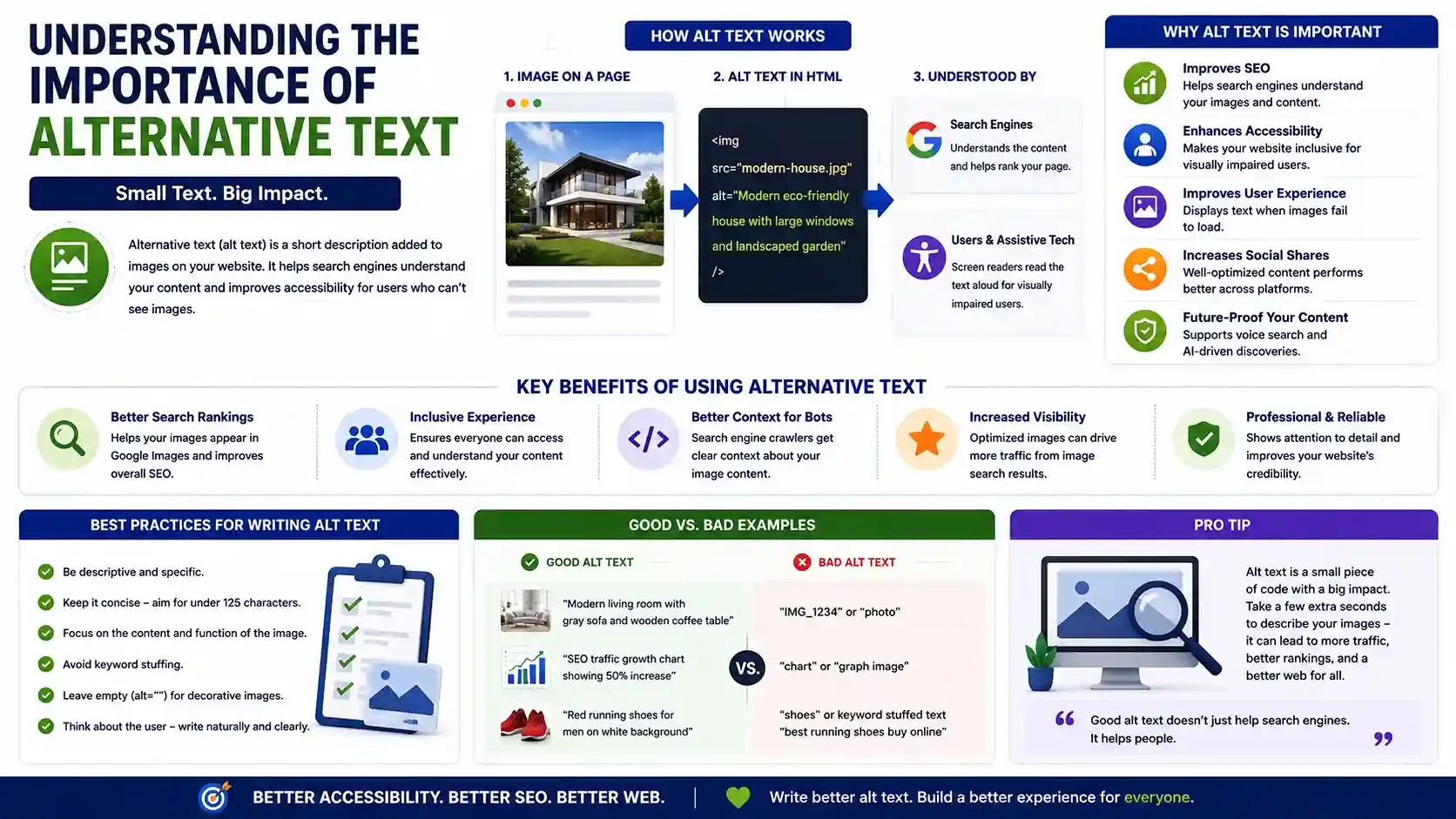
The modern digital landscape is incredibly visual. From high-resolution product photography to data-rich infographics, images are fundamental to how we consume information online. They break up large walls of text, convey emotion, and clarify complex ideas. However, what happens when an image fails to load due to a poor connection? Or, more importantly, how do users with visual impairments experience your visual content?
Businesses can significantly boost their search engine visibility by maximizing SEO through social media strategies that drive organic traffic and engagement.
This is where alternative text SEO (often referred to as alt text) steps into the spotlight. While it may seem like a minor detail in the backend HTML of your website, alt text serves a dual purpose that is absolutely critical to the success of your web pages: it bridges the gap between visual content and accessibility, while simultaneously acting as a powerful tool for search engine optimization.
Table of Contents

The Core of Visual Accessibility
Before diving into the marketing benefits, we must look at the human element. Meeting web accessibility standards for images is not just a technical checklist—it is a fundamental aspect of creating an inclusive internet.
To truly grasp this concept, you need to understand how screen readers process visual content. When a visually impaired user navigates a website using assistive technologies (like JAWS, NVDA, or VoiceOver), the software scans the underlying HTML code. Because a screen reader cannot interpret the pixels in a JPEG or PNG, it relies entirely on the alt text provided by the developer. It reads this text aloud, effectively translating visual data into a spoken narrative.
The impact of visual accessibility on user experience cannot be overstated. Without alt text, a screen reader might simply read out a long, confusing file name like “IMG_49582_final_v2.jpg,” or skip the image entirely. This creates a frustrating and disjointed experience, potentially locking the user out of crucial information.
By strictly adhering to the WCAG guidelines for non-text content (Web Content Accessibility Guidelines), webmasters ensure that all non-text elements that convey meaning have a text alternative. This commitment to inclusivity ensures your content is available to everyone, regardless of their physical abilities.
The Undeniable Link Between Alt Text and Search Engines
While accessibility is the primary purpose of image descriptions, the intersection of alt text and seo is a foundational digital marketing strategy. Just as screen readers cannot “see” images, neither can search engine crawlers like Googlebot. Search engines rely on text to understand the context, subject matter, and relevance of a visual asset.
When you implement a strong alternative text seo strategy, you are essentially translating your images into a language that search engines can index. This is where seo image alt text becomes invaluable. By accurately describing your visuals, you provide search algorithms with the context they need to rank your page appropriately.
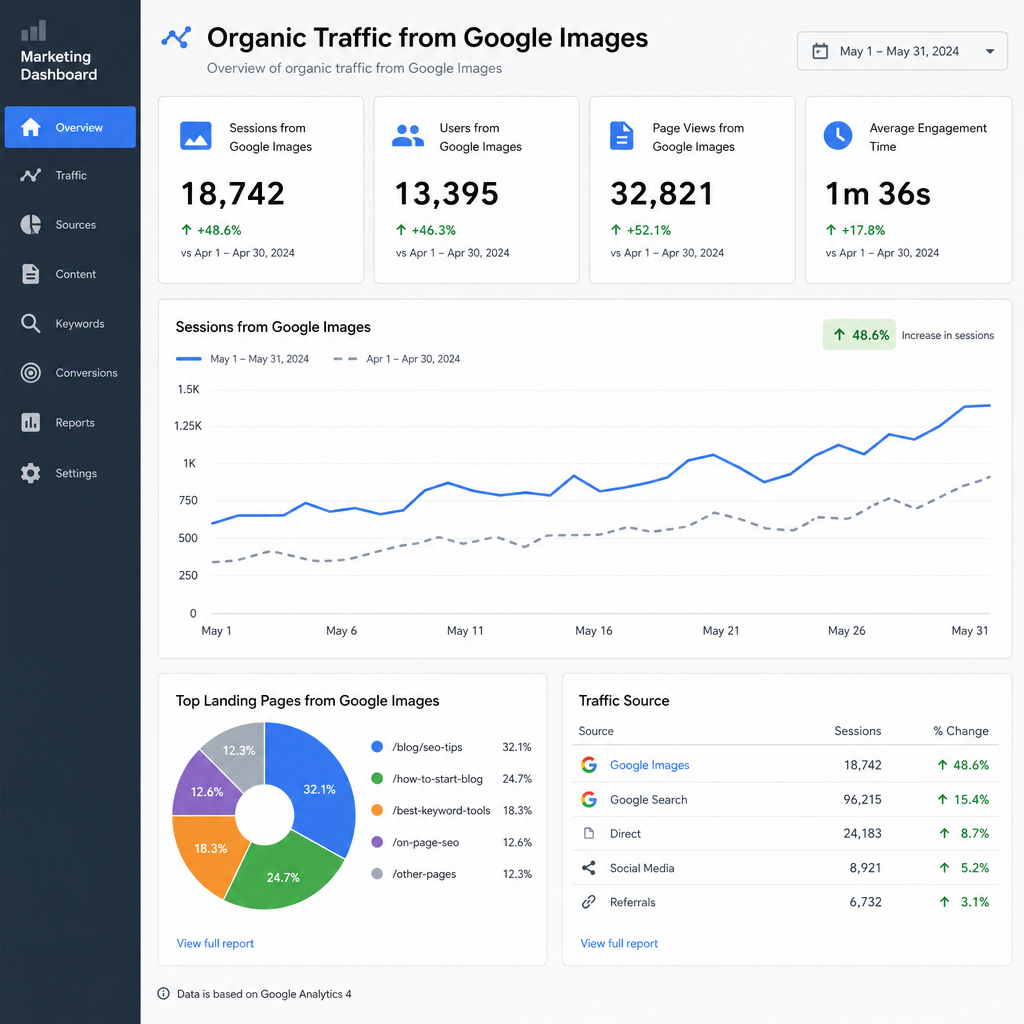
If you are serious about boosting organic image traffic, neglecting your images is a massive missed opportunity. Google Images accounts for a significant portion of all web searches. Enhancing image search visibility through accurate descriptions can drive an entirely new stream of high-intent traffic to your website. For e-commerce stores, a well-optimized product image appearing in search results can be the direct catalyst for a sale.
Furthermore, alt text plays a crucial role in improving site indexation with metadata. When your alt text aligns with your page’s heading tags, body copy, and URL structure, it reinforces the topical relevance of the entire page, giving your overall SEO a noticeable lift.
Technical Nuances: Tags, Attributes, Titles, and Captions
The digital marketing world is full of jargon, and image optimization is no exception. Let’s clear up some common technical misunderstandings so you can optimize your site with confidence.
Alt Attributes vs. Alt Tags
People frequently search for alt tag seo or alt attribute seo, often using the terms interchangeably. Technically speaking, “alt tag” is a misnomer. The proper terminology is “alt attribute,” as it exists as an attribute within the HTML <img> tag (e.g., <img src=”puppy.jpg” alt=”A golden retriever puppy sitting in a field of daisies”>). Regardless of what you call it, optimizing this specific piece of code is what drives alternative text seo.
Alt Attributes vs. Title Tags
Understanding the difference between alt attribute and title tag is another common hurdle. The alt attribute serves as the primary text alternative for accessibility and search engines. The title tag, on the other hand, is generally used to provide supplementary information. When a user hovers their mouse over an image, the title tag often appears as a small tooltip. While title tags can improve user experience for desktop users, they are not typically read by screen readers by default, nor do they carry the same heavy SEO weight as the alt attribute.
Alt Text vs. Captions
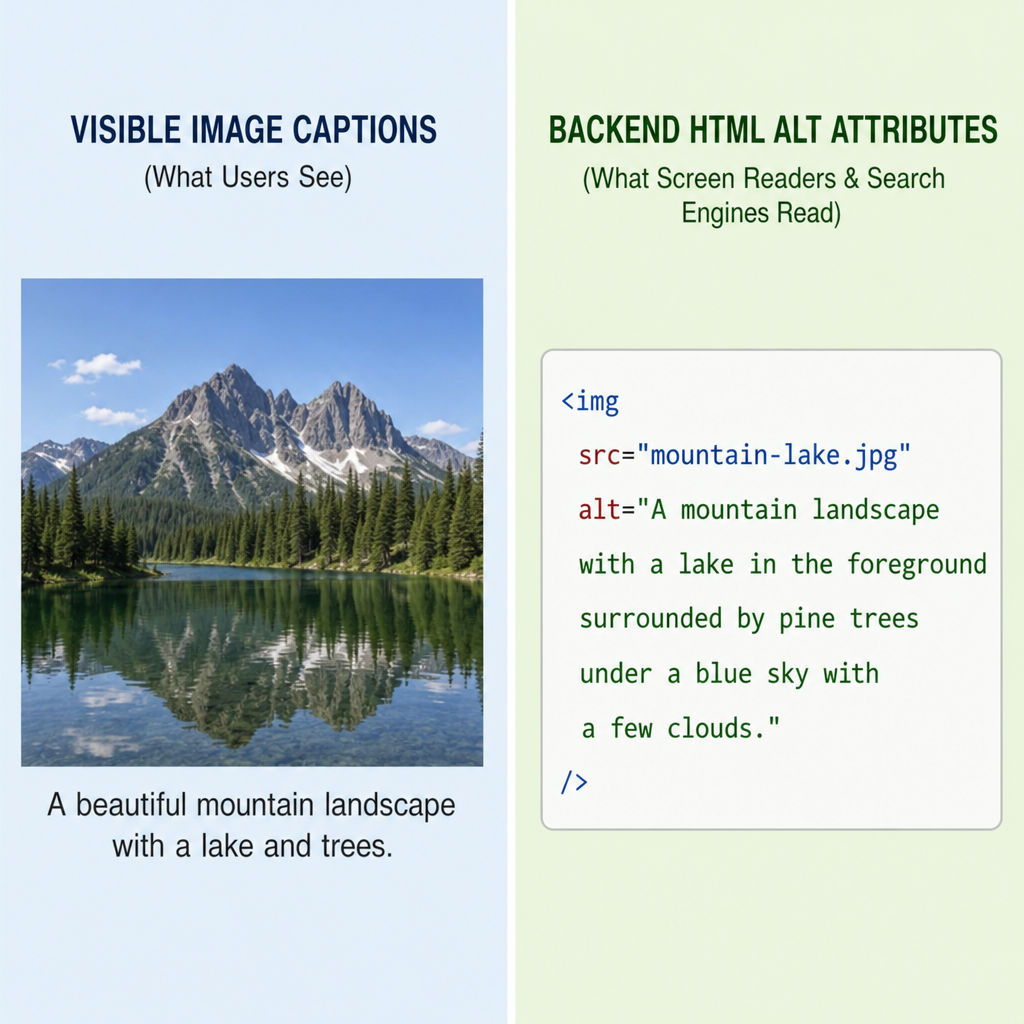
Similarly, creators often get confused by alt text vs image captions. Captions sit visibly on the page below an image and are meant to be read by all users, providing additional context or editorial commentary. Alt text is invisible on the rendered page (unless the image breaks) and strictly describes the literal contents and function of the image. You should use both, but avoid simply copying and pasting your caption into your alt text field, as this creates redundancy for screen reader users.
Mastering the Craft: How to Write Alt Text for Images for SEO
Writing great image descriptions is both an art and a science. If you are wondering how to write alt text for images for seo while maintaining strict accessibility standards, follow these essential guidelines.
1. Be Descriptive and Specific
When figuring out how to write descriptive image alt tags, the best mental exercise is to imagine you are describing the image over the phone to a friend.
- Bad: alt=”car”
- Okay: alt=”red car driving”
- Excellent: alt=”A red Ford Mustang driving on a winding coastal highway at sunset”
2. Context is Everything
The same image might require different descriptions depending on the article it lives in. This highlights the importance of writing contextually relevant image descriptions. For example, if you have a photo of a woman typing on a laptop:
- In an article about ergonomic office furniture: alt=”A woman sitting in an ergonomic mesh office chair while typing on a laptop”
- In an article about remote work software: alt=”A remote worker using project management software on her laptop”
3. Mind the Length
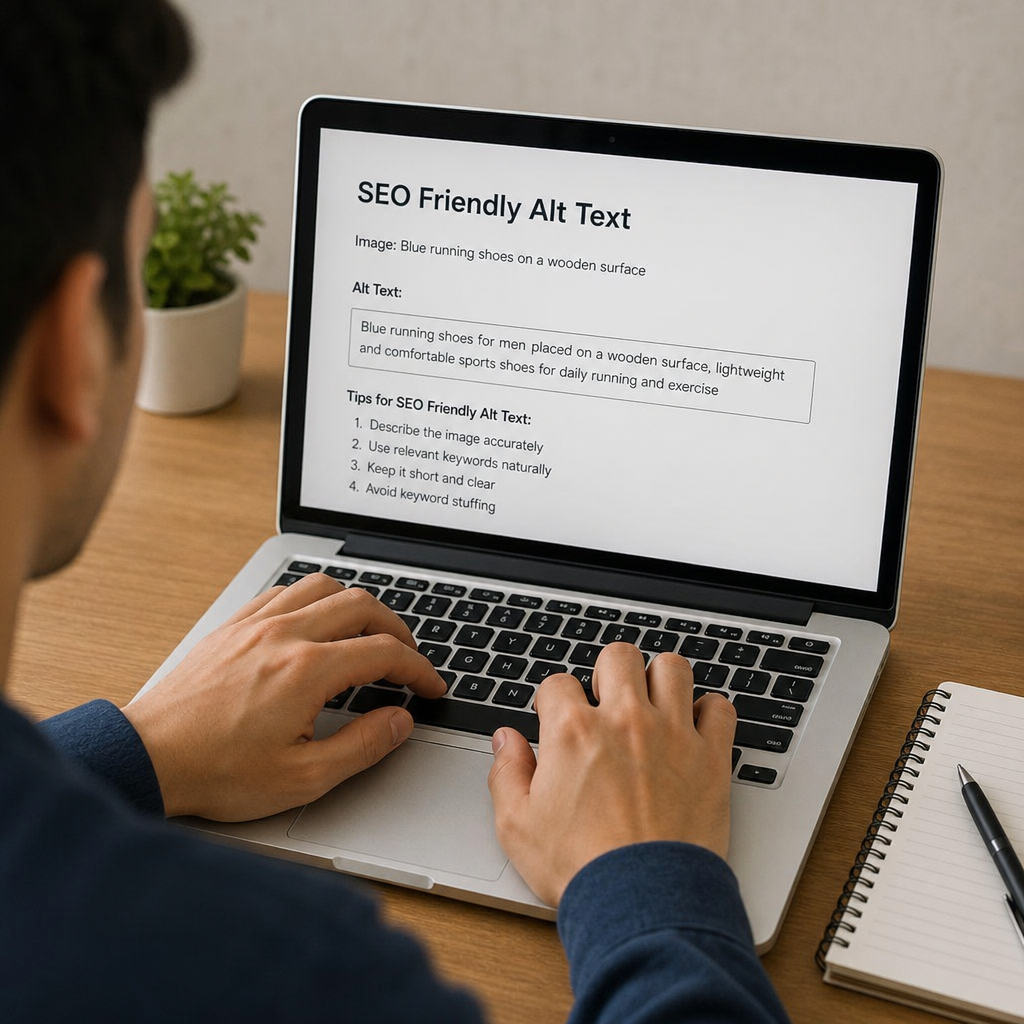
What is the optimal length for image descriptions? Generally, you should aim to keep your alt text under 125 characters. Many popular screen readers will pause or cut off reading after this character limit. Be concise, get straight to the point, and eliminate unnecessary starter phrases like “Image of” or “Picture of”—the screen reader already tells the user it is an image.
4. Avoid Keyword Stuffing
While alt description seo relies on keywords, forcing them where they don’t belong will harm your site. Search engines are smart enough to penalize keyword stuffing.
- Keyword Stuffing (Avoid): alt=”best running shoes cheap running shoes buy running shoes online men’s sneakers”
- SEO-Friendly (Use): alt=”A pair of blue Nike men’s running shoes laced up on a running track”
Naturally incorporate your target keywords only if they accurately describe the visual content of the image.
Navigating Special Image Types
Not all images on your website serve the same purpose. Understanding how to handle different types of visual assets is key to a polished user experience.
Handling Decorative Images
Many websites use images purely for aesthetic purposes. These might include thematic background patterns, stylized thematic borders, or custom bullet points. When it comes to best practices for decorative images, less is actually more.
If an image does not convey any meaningful information or context to the user, a screen reader should skip it. You achieve this by using null alt attributes for spacer images and decorative graphics. A null (or empty) alt attribute looks like this: alt=””.
By leaving the quotation marks empty, you explicitly tell the screen reader, “This image is decorative; ignore it.” If you omit the alt attribute entirely, the screen reader might read the messy file name, disrupting the user experience.
Complex Images and Charts
Infographics and complex data charts require special attention. Because of the 125-character limit, you cannot fully explain a massive bar chart in the alt text. In these cases, write a concise summary in the alt attribute (e.g., alt=”Bar chart showing a 25% increase in Q3 revenue”) and provide the detailed data breakdown in the visible body text of the page.
Conducting an Image SEO Audit
Even the best webmasters forget to add alt text from time to time. To ensure your site remains compliant and fully optimized, you should conduct routine audits aimed at fixing missing image descriptions.
You can use SEO crawling tools like Screaming Frog, Ahrefs, or Semrush to scan your entire website. These tools will generate a comprehensive report highlighting every single image file that is missing an alt attribute.
When you sit down to fix these errors, prioritize high-traffic pages, product pages, and blog posts that generate the most revenue or engagement. Methodically work your way through the list, applying the principles of context, brevity, and keyword relevance to each missing description.

The Final Takeaway
Ultimately, alternative text seo is about communication. It is about clearly communicating your content’s value to search engine algorithms so you can rank higher, and, more importantly, clearly communicating your visual message to human beings who rely on assistive technologies.
By taking the time to craft thoughtful, concise, and descriptive alt text, you are doing much more than checking off an SEO box. You are building a more inclusive, accessible, and easily discoverable website. Every image tells a story—make sure you are giving everyone, and every search engine, the opportunity to hear it.