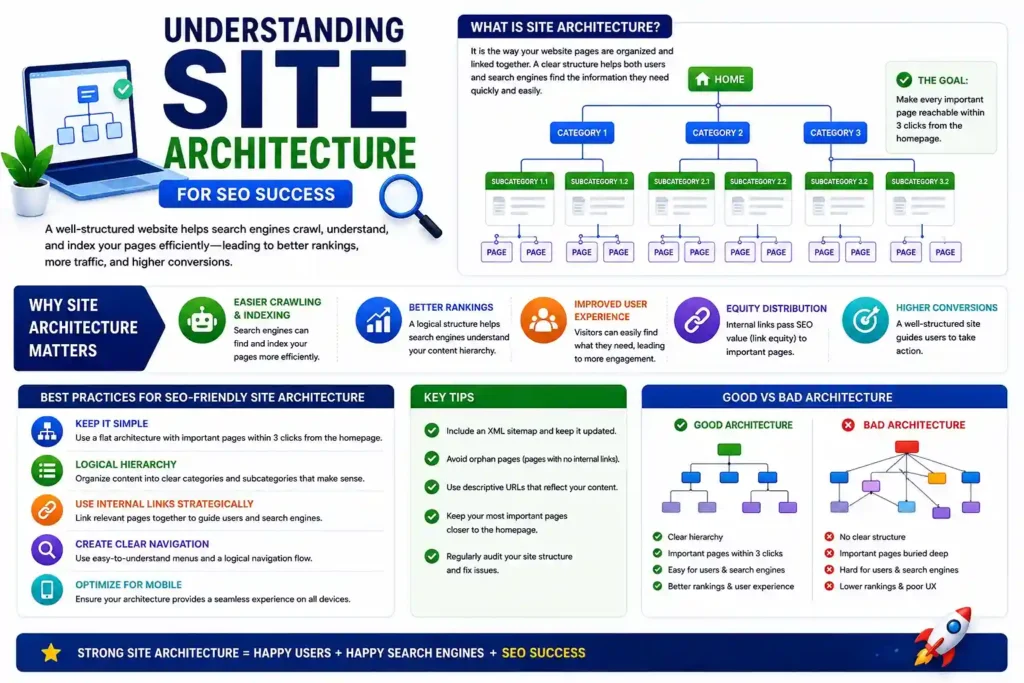
Site architecture SEO is crucial for SEO success. It determines how search engines and users navigate your website.
A well-structured site enhances user experience and boosts search engine rankings. It ensures that your content is easily accessible and indexed.
Table of Contents
Understanding the principles of SEO-friendly site architecture can transform your website’s performance.
This guide will explore the best practices for creating an effective site structure.
Learn how to optimize your website architecture for better SEO results and user satisfaction.
What Is Site Architecture and Why Does It Matter for SEO?
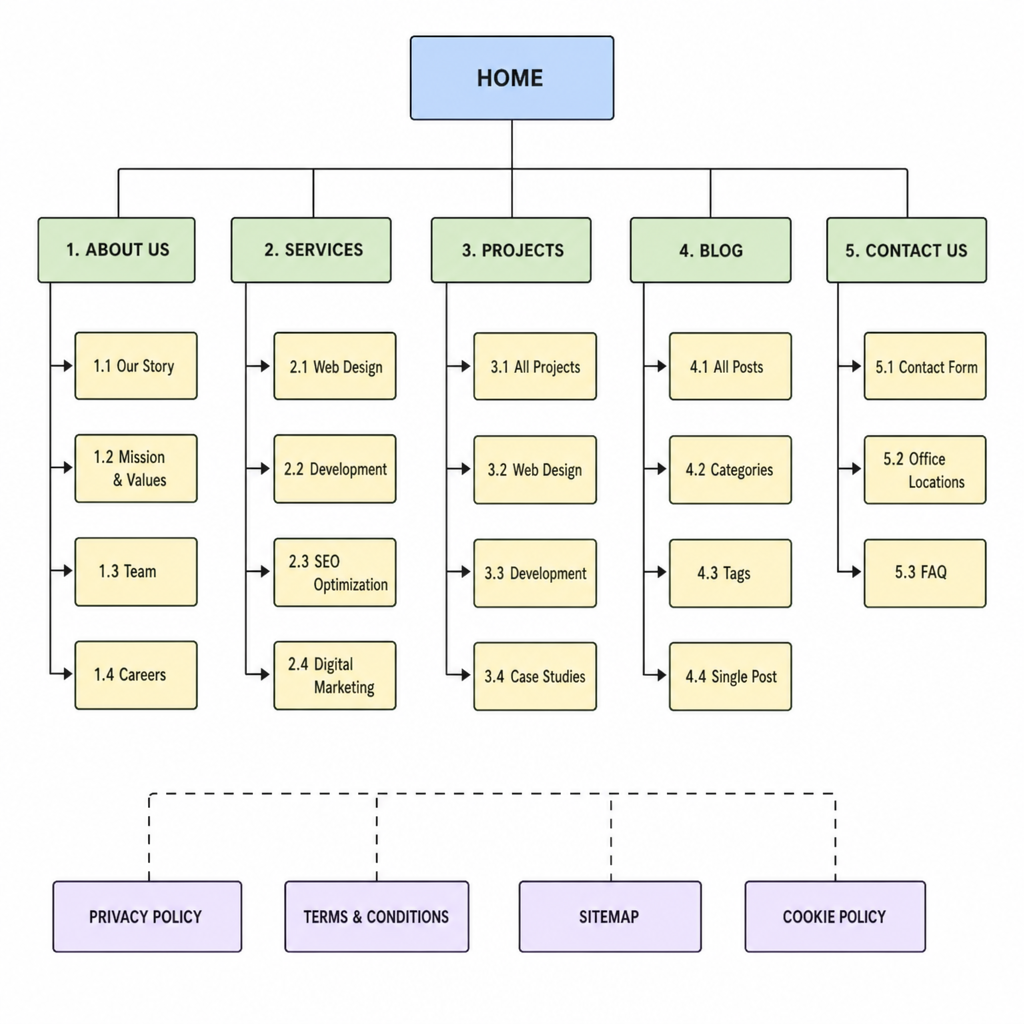
Site architecture is the framework of how pages are organized and linked within a website. It’s about the hierarchy and structure that guide both users and search engines.
A well-planned architecture is crucial for several reasons. It enhances user experience by making navigation intuitive. It also ensures that search engines can crawl your site effectively.
Key benefits include:
- Improved user experience.
- Better search engine indexing.
- Increased page authority distribution.
- Enhanced website performance.
An effective site architecture helps search engines understand the relationships between pages. This understanding is vital for ranking and indexing. An organized site with clear navigation creates a seamless experience for users and bots.
Visualizing your site’s architecture can be beneficial. Use tools like sitemaps to plan a logical flow, ensuring no page is more than three clicks away.
Key SEO Considerations for Website Architecture
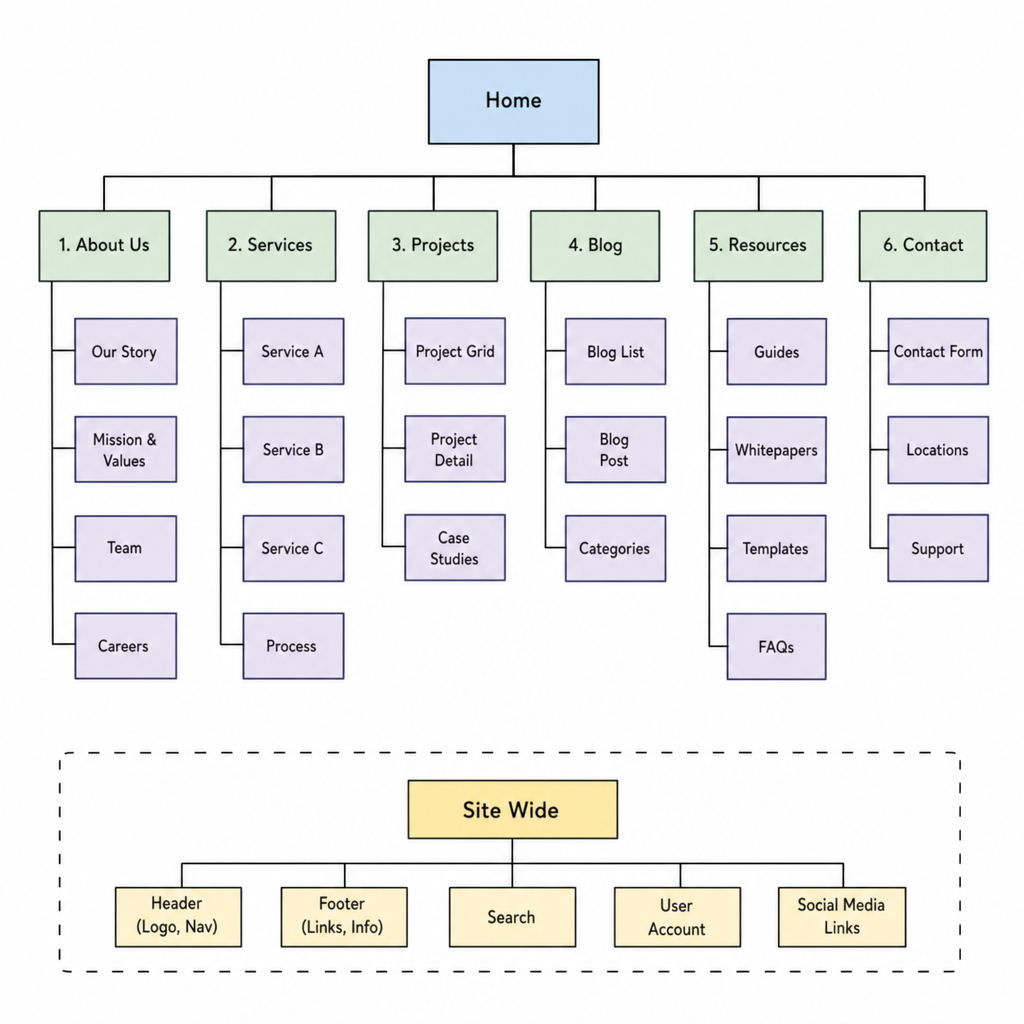
When designing your website architecture, SEO should be at the forefront. Structuring your site properly can greatly impact visibility and ranking.
Firstly, think about creating a clear hierarchy. This means organizing content into categories and subcategories. A well-defined structure aids in both user navigation and SEO indexing.
Next, ensure your site is mobile-friendly. Google’s algorithms prioritize responsive design, which significantly affects search rankings. Mobile-friendliness is now non-negotiable.
Another essential is URL optimization. URLs should be simple, descriptive, and consistent across your site. Descriptive URLs improve click-through rates and usability.
Consider these key points:
- Prioritize user experience.
- Implement a clear content hierarchy.
- Optimize for mobile responsiveness.
- Simplify and standardize URL structures.
Proper internal linking is vital for distributing page authority and aiding navigation. Linking related content helps search engines understand the content context and ranking importance.
Regularly use tools to audit your site architecture. These tools identify weaknesses and areas for improvement. An ongoing SEO strategy ensures your site remains competitive and optimized
Hierarchical vs. Flat Site Structures: Which Is Best for SEO?
Choosing the right site structure is crucial for SEO. The two primary types are hierarchical and flat structures.
In a hierarchical structure, content is organized by categories and subcategories. This setup is ideal for websites with extensive content. It helps users easily navigate and find information. Search engines benefit from understanding content relationships.
On the other hand, flat site structures minimize the number of clicks to reach any page. This arrangement is beneficial for smaller sites. It allows search engines to index pages more efficiently.
When deciding which structure suits your site, consider the following:
- Hierarchical structures work best for large, complex sites.
- Flat structures are ideal for smaller, content-focused sites.
- Consider user experience and ease of navigation.
Ultimately, the best choice depends on your site’s needs and objectives.
Essential Elements of an SEO-Friendly Website Structure
Crafting an SEO-friendly site structure involves key elements. These elements enhance both user experience and search engine performance.
First, clear and logical navigation is crucial. Users should easily find their way around your website. Effective navigation encourages longer visits and better engagement.
Internal linking also plays a vital role. It helps distribute page authority and boost visibility of important content. Ensure your links are relevant and support the user’s journey.
Moreover, a well-optimized URL structure improves indexability. URLs should be descriptive and consistent, aiding both users and search engines.
Consider implementing breadcrumbs to show users their path through your site. Breadcrumbs improve user experience and help search engines understand your site’s hierarchy.
Key elements include:
- Clear navigation
- Strong internal linking
- Optimized URL structure
- Effective use of breadcrumbs
An organized architecture will greatly benefit your site’s SEO.
Navigation and Internal Linking Best Practices
Navigation defines a user’s site experience. To achieve the best results, prioritize simplicity and clarity. Use intuitive menus and consistent layouts across pages.
Internal linking supports authority flow and improves SEO. To maximize its impact:
- Use descriptive anchor text for clarity.
- Link to relevant content within the same category.
- Ensure no page is more than three clicks away from the homepage.
Regular audits of internal links identify areas for improvement. A seamless link structure supports both user engagement and search engine crawling.
Optimizing URL Structure for SEO
URL structure is foundational for SEO. It should be simple yet descriptive. A clear URL helps users and search engines understand content.
When forming URLs, consider these practices:
- Use keywords naturally in URLs.
- Separate words with hyphens, not underscores.
- Maintain consistency in the URL format across the site.
Consistent, readable URLs support better indexing and improve user trust.

Breadcrumbs and Sitemaps: Enhancing Crawlability
Breadcrumbs guide users through the site, showing their current location. They reduce bounce rates and help search engines understand site hierarchy.
Sitemaps are crucial for informing search engines about your website’s structure. They should be updated regularly to reflect site changes.
For effective use, consider:
- Including breadcrumbs on every page.
- Submitting an XML sitemap to search engines.
- Ensuring sitemaps include all important pages.
Implement these tools to boost crawlability and improve SEO.
Technical SEO Factors in Site Architecture
Technical SEO underpins strong site architecture. It ensures that your website meets search engine requirements. Proper implementation boosts visibility and rankings.
Mobile-friendliness is a vital component. Today’s users access websites via mobile devices more than ever. Implementing a responsive design guarantees a seamless user experience across devices.
Optimizing site speed and performance is also crucial. Slow-loading pages can deter users and harm your SEO rankings. Thus, quick access to your site’s content is non-negotiable.
Ensure that your site is secure. Use HTTPS to protect user data and enhance trustworthiness. Accessibility makes your site usable for all visitors, including those with disabilities.
Key technical factors include:
- Mobile optimization
- Speed and performance improvements
- HTTPS implementation
- Accessibility for all users
Technical SEO ensures a solid foundation for your site’s architecture.

Mobile-Friendliness and Responsive Design
A mobile-friendly site is no longer optional. Responsive design enhances experiences across all devices. Ensure your site adjusts seamlessly to different screen sizes.
To achieve mobile-friendliness:
- Test your site using mobile-friendly tools.
- Optimize images to load efficiently on mobile.
- Ensure that navigation is easy on small screens.
Responsive design is a must for SEO success
Site Speed and Performance Optimization
Site speed impacts both user satisfaction and SEO. Quick loading times engage users and improve rankings. Reducing page load times is essential.
To enhance site speed:
- Compress images for faster loading.
- Minimize HTTP requests.
- Use browser caching to speed up repeat visits.
Optimize site performance for a better user experience.

Security, HTTPS, and Accessibility
Security is crucial for protecting your site and users. HTTPS not only secures data but is also a ranking factor. Secure sites gain more trust from users and search engines.
For site security:
- Implement SSL/TLS certificates.
- Regularly update software and plugins.
- Use security plugins to protect the site.
Accessibility ensures all users can navigate your site easily.
Common Site Architecture Mistakes to Avoid
Mistakes in site architecture can hinder SEO performance. Being aware of common pitfalls is crucial for maintaining an effective structure. Such errors can lead to poor user experience and lower rankings.
Key site architecture mistakes to watch out for include:
- Ignoring mobile optimization
- Broken or orphaned links
- Complex navigation structures
Avoid these pitfalls to ensure a seamless experience for users and search engine
Auditing and Improving Your Website Architecture for SEO
Regular audits of your site architecture are essential for continued SEO success. This process helps identify potential issues and areas for enhancement. It ensures that your website stays optimized for both users and search engines.
Effective steps for auditing your website architecture include:
- Analyzing internal linking
- Reviewing URL structures
- Checking for broken links
Performing these steps regularly can significantly impact your site’s performance. Adjustments based on audit findings can enhance crawlability and user experience.

Conclusion: Building a Future-Proof SEO Architecture
Creating a robust site architecture is vital for long-term SEO success. It ensures your website is navigable, optimized, and adaptable. By implementing best practices, your site can maintain strong search engine rankings.
Investing in a future-proof architecture is essential for adapting to evolving SEO trends. Continual updates and audits will keep your site competitive and aligned with user expectations.